Sephral
Module Developer
Modules
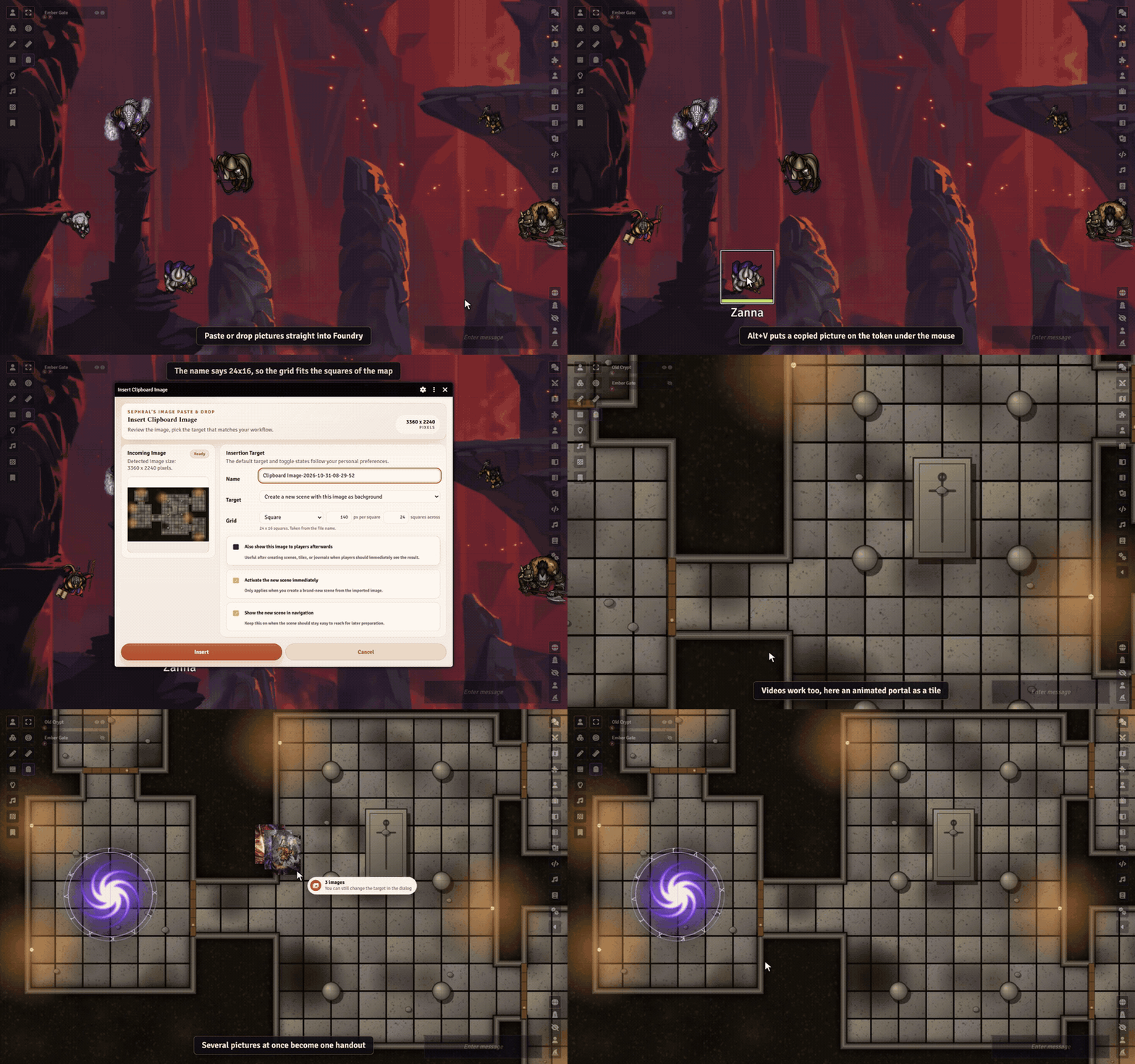
Sephral’s Image Paste & Drop
Sephral’s Image Paste & Drop Found the perfect map online? Press Ctrl+V. Image Paste & Drop turns any image from your clipboard, your desktop or a web page into a scene, a tile, a handout or a picture for your players, in seconds. Highlights Paste or drop: paste a screenshot or a copied image address with Ctrl+V, or drag an image file or a picture from your browser onto Foundry. You decide what it becomes: a new scene with the image as its background, the background or foreground of the current scene, a tile, a journal page, a map pin, a token image, an actor portrait, a chat post or a picture shown to all players or just the ones you pick. Drop it where it belongs: drop an image onto a token, a tile or an open sheet and it becomes that picture. A soft glow shows where it will land. Several images at once: one handout with a page each, a grid of tiles or a new scene per map. The grid fits the map: square or hexagons, either way up. The grid printed on the map is found for you and Foundry's grid lies right on it. Nothing found? Drag across a few cells to measure it. A map named Tavern 30x20 works too. Animated maps too: drop a WebM or MP4 video and it plays as scene background, tile, token or handout. One key and done: Alt+V sends the copied image to your usual target, Alt+P shows it to your players at once. No file juggling: the image is uploaded and filed away for you, never stored twice. Huge images can be shrunk and saved as WebP, and the dialog shows how small the file will be. Image links too: copy an image address in your browser and paste it. Token pictures, made ready: drop a plain background, cut to a square, add one of 14 drawn frames in the owner's color or your own, and see it live. Choose whether the token, the prototype or the portrait too gets it, and bring a replaced picture back. Players can join in: let players show images or give their own token a new look, with the permissions you choose. Remembers your routine: set a default target or reuse the last one, so the next image takes a single click. How it works Copy an image or an image address, or grab a file from your desktop. Press Ctrl+V anywhere outside a text field, or drop it onto Foundry. Pick a target in the preview dialog and confirm. By default only the GM can use it. Player access is one setting away. Install Search for Image Paste & Drop in Foundry's module browser or open the package page . Foundry VTT 13 and 14 · any game system · works on The Forge · English and German Learn more The manual explains every target, the player permissions, where images are stored and how to choose your own storage folder. Questions or ideas? Join us on Discord . Looking for more? See all modules by Sephral . License See LICENSE.md .
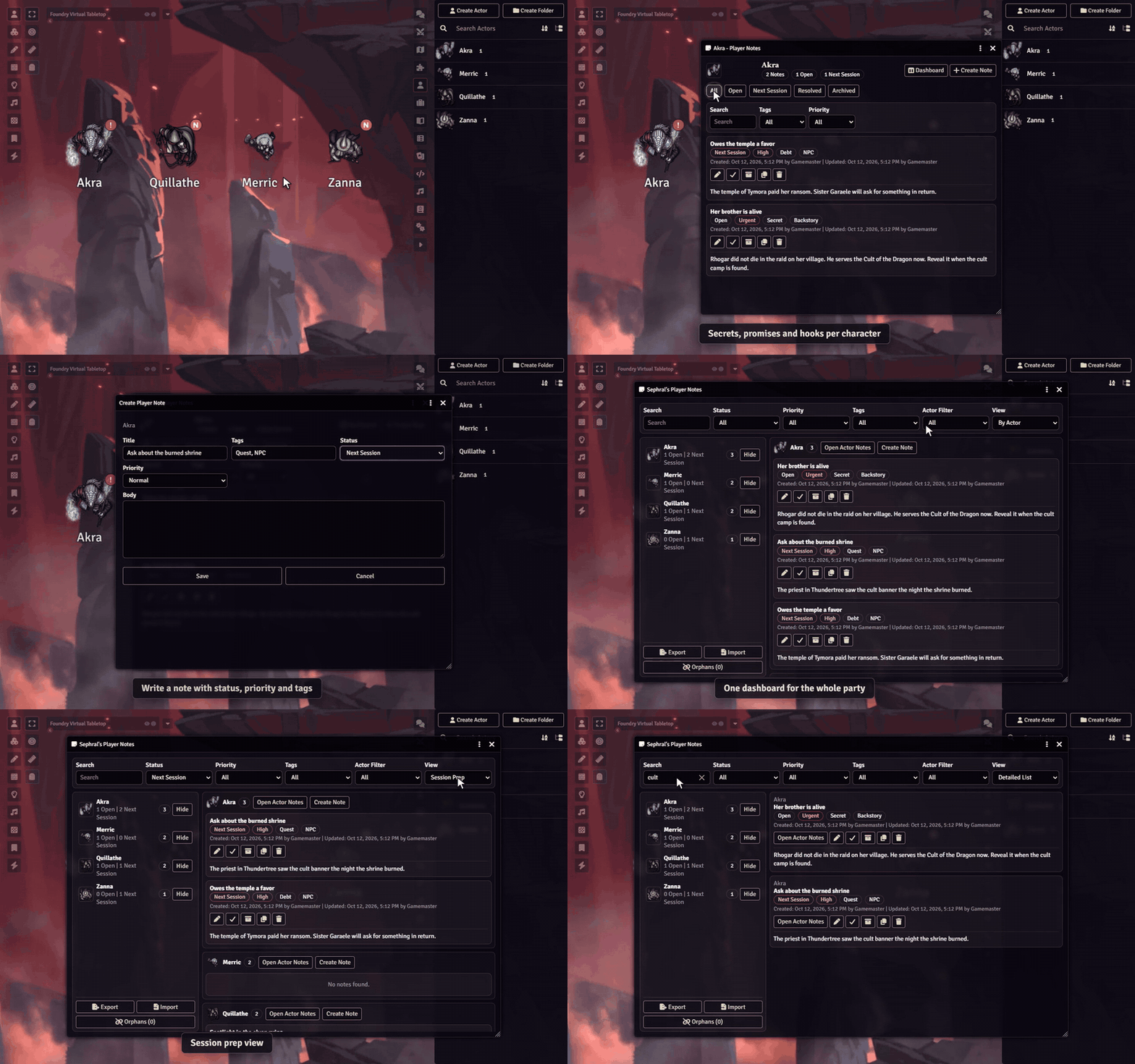
Sephral’s Player Notes
Sephral’s Player Notes The bard still owes the smith 50 gold. The rogue's sister is alive. You promised the paladin a scene of her own. Player Notes keeps all of it right on the characters, so nothing slips through between sessions. Highlights Notes where they belong: private GM notes on every player character, one click away from the sheet, the actor directory or the token HUD. Straight from the chat: right click a message and turn it into a note for the character, with the text and a link back that opens the note right away. Made for campaign memory: story hooks, secrets, promises, debts, unresolved scenes and spotlight reminders. Know what is due: statuses like Open and Next Session , priorities from Low to Urgent and tags of your own. One dashboard for the whole party: filter by character, status, tag or priority, or switch to the session prep view before game night. Reminders at a glance: the actor directory, and the tokens if you like, show who has urgent notes or notes for the next session. Session prep to go: export your prep as Markdown or back up everything as JSON. Imports show a preview first. How it works Open a character's notes from the sheet menu, the actor directory or the token HUD. Write the note and set a status and a priority. Before the next session, open the dashboard and see everything that is due. Good to know Players never see the notes in any window of the module. The notes are stored on the actor without encryption, though, so a player who knows the browser console could read them. Keep anything players must never find out somewhere else. Install Search for Player Notes in Foundry's module browser or open the package page . Foundry VTT 13 and 14 · any game system · English and German Learn more The manual covers every view of the dashboard, export and import, how notes are stored and the macro API. Questions or ideas? Join us on Discord . Looking for more? See all modules by Sephral . License See LICENSE.md .
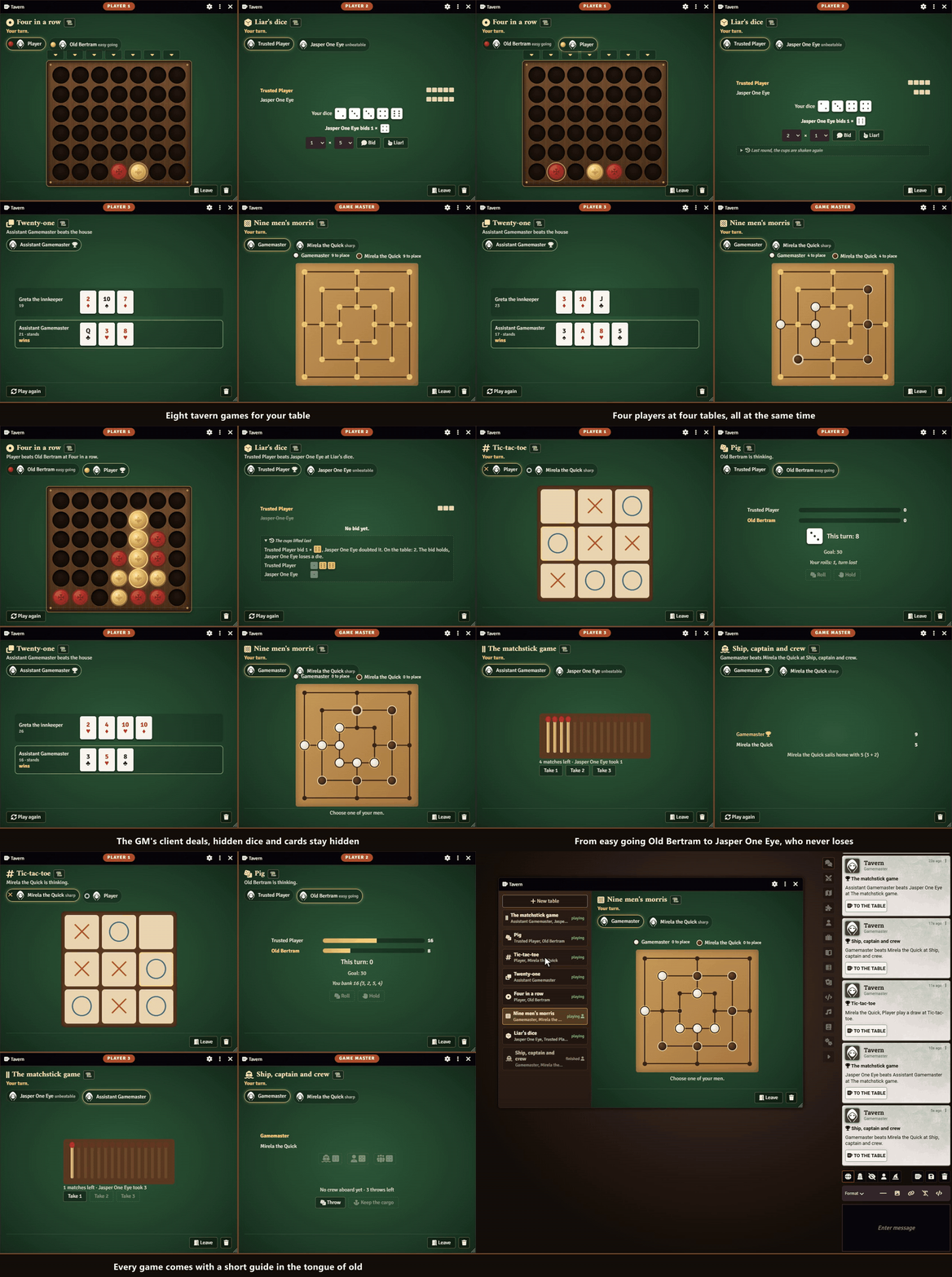
Sephral’s Tavern Games
Sephral’s Tavern Games The rain hammers on the shutters, the stew is still bubbling, and Old Bertram slams a cup of dice on the table. Tavern Games brings the games of the common room to your table: play against each other or against the regulars, while everyone else watches and cheers. Highlights Nine tavern classics: tic tac toe, four in a row, nine men's morris, the matchstick game, the dice games Pig, liar's dice, Mia and ship, captain and crew, and twenty one against the house. Rules in the tongue of old: every game comes with a short guide, and the GM picks the games the tavern offers. Against each other: open a table, a friend joins, and you play in turns. The dice games take up to four players, twenty one up to four against the dealer. Against the regulars: Old Bertram plays for fun, Mirela the Quick is sharp, and nobody has ever beaten Jasper One Eye at the matchstick game. The whole room watches: every table is open to everyone, so the rest of the group can follow along. Fair play: the GM's client runs every table, checks every move and keeps hidden things hidden: the dealer's face down card and the dice under everyone's cup. A suggestion for the break: pause the game and the players see one suggested game, preferably one nobody has tried yet, with one button to join in. The GM can switch it off. The first game explains itself: whoever plays for the first time gets two short lines at the table. Play for a stake: twenty one, liar's dice and Mia can be played for play money, never real coins. Bragging rights: invitations and results appear in the chat. The evening ends with a ranking, and every player earns a tavern title from Stranger to Tavern Legend. How it works Enable the module. Open the tavern with the mug in the token controls or below the chat and click New table . Pick a game and a regular, or wait for a friend to join, and play. Good to know A GM has to be online for the tables to run. Everyone can still watch. Install Search for Tavern Games in Foundry's module browser or open the package page . Foundry VTT 13 and 14 · any game system · English, German and Russian Learn more The games, the regulars and the settings are explained in the manual . Questions or ideas? Join us on Discord . Looking for more? See all modules by Sephral . License See LICENSE.md .
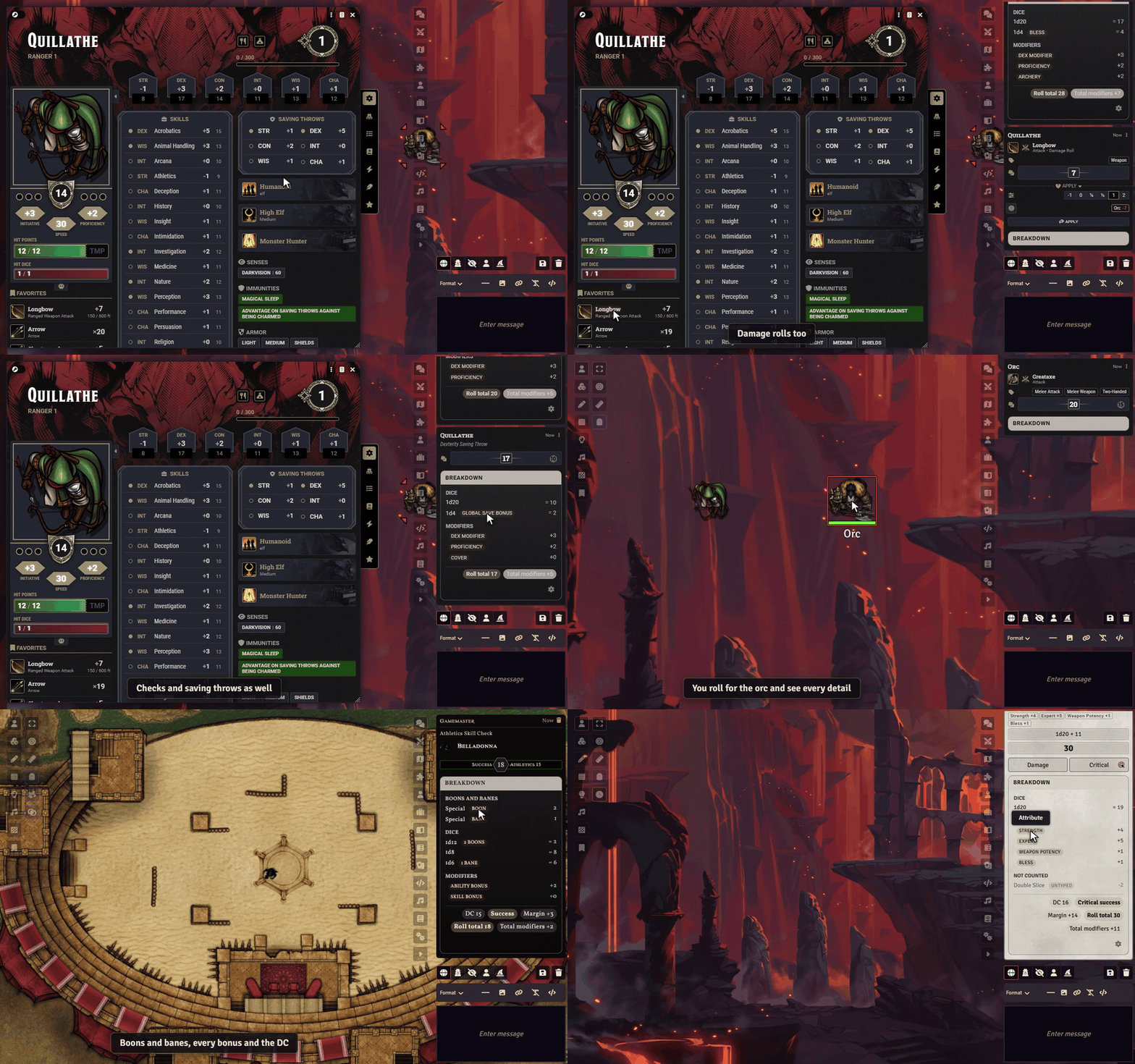
Sephral’s Roll Breakdown
Sephral’s Roll Breakdown "Wait, why is my attack +9?" Roll Breakdown answers that right on the chat card: every die, every modifier and, in D&D 5e, the reasons for advantage and disadvantage. The demo uses Quillathe, one of the premade heroes of the D&D 5e system, with Bless and Archery as active effects. Highlights The answer at a glance: one short line on the card names the main parts, such as "+5 STR, +3 Prof, +1d4 Bless, advantage from Help". No click needed, and resting the mouse on it shows the full breakdown with the chance of success against the target. Every number explained: a click on the line opens a compact panel on the chat card shows the dice, the modifiers and every other part of the formula. Made for D&D 5e: attacks, damage, saves, ability, skill and tool checks, concentration and death saves, each with its real sources. Why advantage? When modules like MidiQOL record the reasons, the panel lists them, such as flanking, a prone target or long range. In D&D 5e 6 it also names the effects whose rules grant advantage or a bonus. Fits your chat: the breakdown takes the colors of the chat card, and the parchment look stays available as Classic. My dice luck shows how your d20s went this evening. Honest by design: the panel only shows what the roll really contains. It never guesses a source. Monster bonuses stay secret: players see no breakdown on NPC and GM rolls, unless you want them to. GM rolls stay behind the screen: if you like, players see only the total of your rolls, and your private rolls not at all. Out of the way: the panel stays folded until someone opens it, and an open panel stays open while the chat updates. Each player picks for themselves: line only, line and button, or button only. Made for Crucible too: see which boons and banes changed which die, where every bonus comes from, the result against the DC and how the damage adds up. More systems: Pathfinder 2e, Starfinder 2e and Savage Worlds show their named modifiers and results, every other system gets a general breakdown of dice and modifiers. How it works Enable the module. Roll as usual. Read the short line on the chat card, or click it to see every part. You decide who sees the line and the panel: only the GM, the GM and the owner of the roll, or everyone. Install Search for Roll Breakdown in Foundry's module browser or open the package page . Foundry VTT 13 and 14 · any game system, extra details for D&D 5e, Crucible, Pathfinder 2e, Starfinder 2e and Savage Worlds · English and German Help it get better A modifier shows up as unknown? Post a screenshot of the chat card on Discord and help teach the breakdown something new. Learn more The manual lists every setting, explains what can be resolved and what cannot, and what a helpful bug report contains. Looking for more? See all modules by Sephral . License See LICENSE.md .
Sephral’s Combat Log & Stats
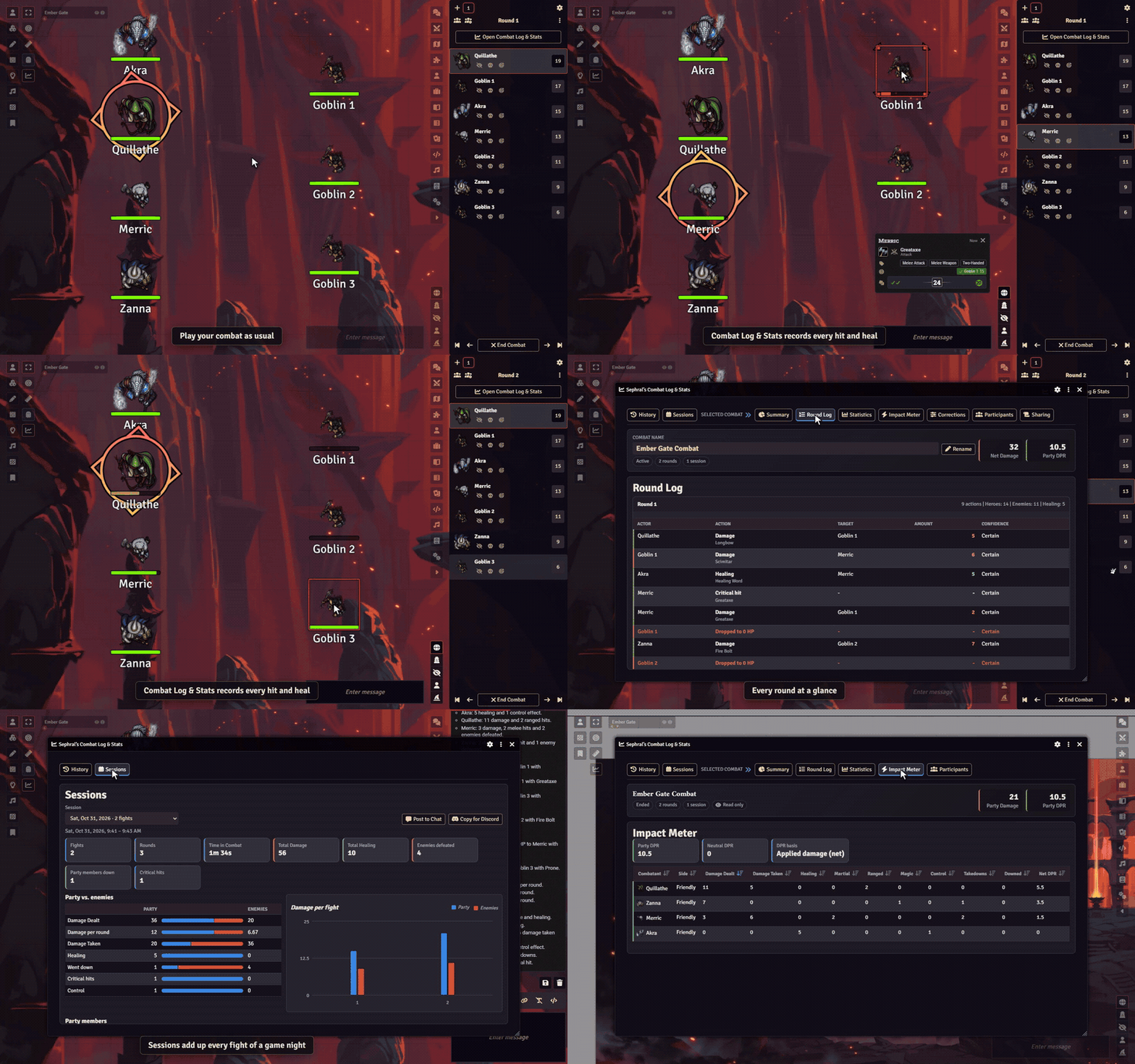
Sephral’s Combat Log & Stats Who carried the fight? Who almost went down? Who kept the ogre on the ground for three rounds? Combat Log & Stats records every fight while you play and turns it into numbers for you and a recap your players will love to read. Highlights Records itself: start a combat as usual and the log runs in the background, round by round. A reload does not stop it. A summary when the fight ends: a short card in the chat names the biggest hit and the closest call, tells the fight in one sentence per round and has a button to the full report. Whispered to you by default, and you can share it with the players as a summary or the full recap. A danger bar for you: during the fight the combat tracker shows the GM heroes against opponents by hit points at a glance. A log outside combat too: hit point and condition changes, deaths and rests between the fights, kept per game night so you see what happened since the last fight. Every number that matters: damage dealt and taken, healing, takedowns, times downed, critical hits, fumbles, control plays and damage per round for every combatant. Credit where credit is due: in D&D 5e every hit and heal goes to the combatant who rolled it, also with Midi-QOL. Other systems match hit point changes to the rolls behind them. Made for Crucible too: health, wounds, morale, madness and every confirmed action card credited to its user. Impact Meter and awards: a sortable ranking, damage per round for both sides, and awards such as MVP and Lucky Dice. Game nights at a glance: the Sessions tab adds up every fight of an evening or of the whole campaign. Post it to chat or copy it for Discord. Recaps for the table: share a report in chat, as a journal or in Discord, with a preview first. Players can look too: the same window, read only. Enemy names and numbers can stay hidden, GM notes never appear. You have the last word: correct or add damage and healing by hand, and export every fight as JSON, Markdown or CSV. How it works Start a combat in the combat tracker. The log starts with it. Play as always. Roll and apply damage and healing from the chat cards. End the combat. A summary card appears in the chat, and the Sharing tab turns the fight into a report for your players. Open the window any time with the chart icon in the token controls. Install Search for Combat Log & Stats in Foundry's module browser or open the package page . Foundry VTT 13 and 14 · any game system, exact attribution in D&D 5e, Pathfinder 2e and Crucible · English and German Learn more The manual explains exactly what is tracked, every setting, the report sections, the exports and where combat logs are stored, also on The Forge. Questions or ideas? Join us on Discord . Looking for more? See all modules by Sephral . License See LICENSE.md .
Sephral’s Roll Triggers
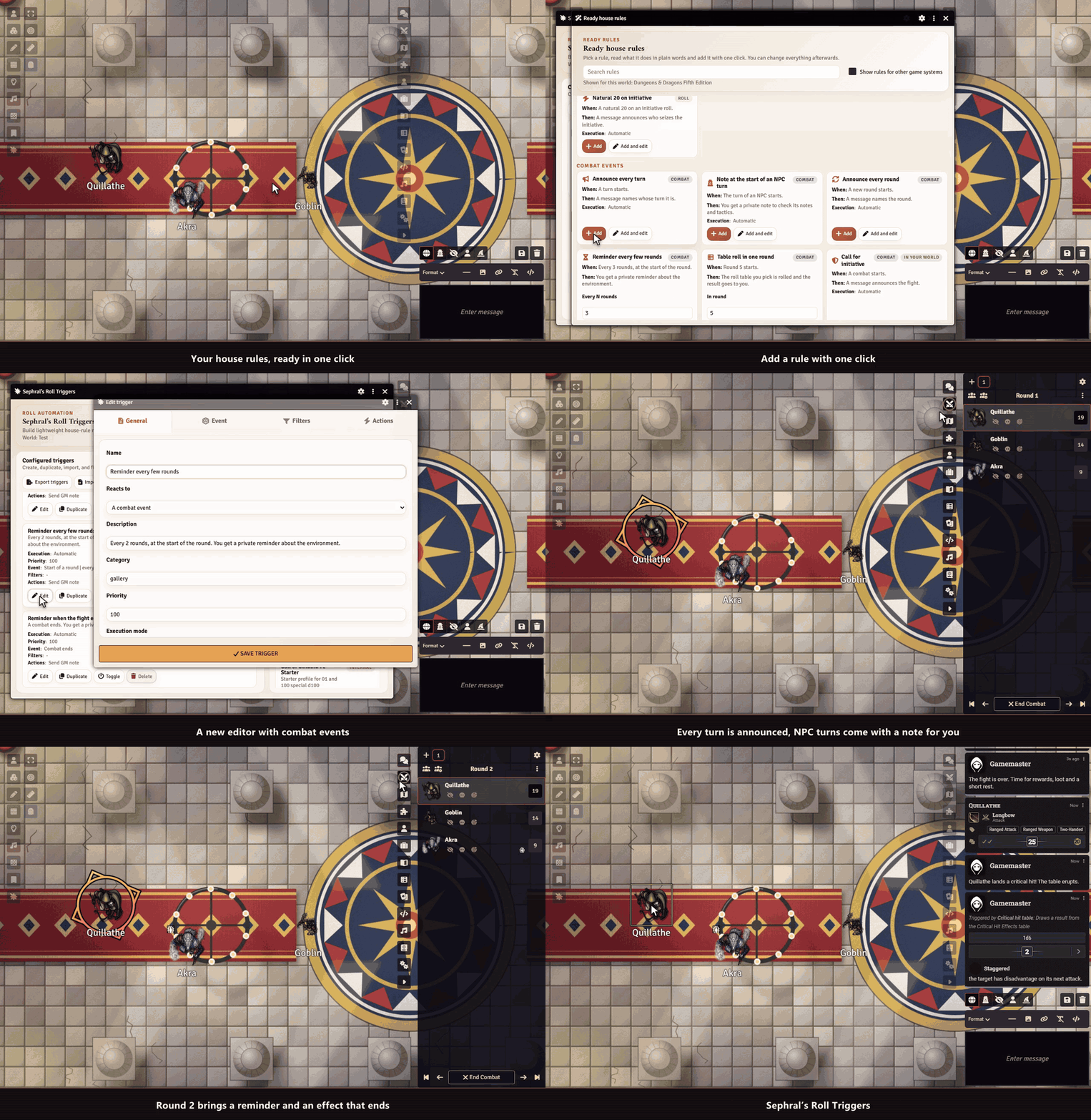
Sephral’s Roll Triggers Natural 20? Roll on the crit table. Natural 1? Time for the fumble table. Doubles on a d100? Note an improvement. Roll Triggers brings your house rules to life: it watches every roll and every combat and reacts the way your table wants. Highlights Ready rules in one click: a gallery of house rules you read in plain words and add with one click, then tweak. It shows what fits your game system: a critical hit table, Inspiration for a natural 20, a warning for a failed death save, a hero point in Pathfinder 2e. React to combat too: act at the start or end of a turn, at the start of a round or every few rounds, when a fight begins or ends, or when an effect on a fighter ends. React to any special roll: natural highs and lows, exact values, doubles and triples, totals, thresholds, degrees of success, or combinations of dice. Make something happen: post a chat message, roll on a table, run a macro, link a journal entry or send the GM a private note. Bring the moment to life: play a sound, show an image, roll an extra die, knock someone prone or hand out inspiration and bennies. Test before you play: try any roll on the test bench and see which triggers fire and why, without touching the chat. You stay in charge: fire automatically, ask the GM first, or show a chat button. Roll Triggers never changes or rerolls a result. Only when it fits: limit a trigger to a roll type, an actor, an item, a scene, combat or the player who rolled. Share your house rules: export triggers and profiles and import them in another world. Ideas for your table Draw from a critical hit table on a natural 20 Whisper the GM a note when a hidden roll crosses a threshold Play a fanfare and grant inspiration on a natural 20 Run a macro on snake eyes, triples or a maximum roll Remind yourself of the weather every third round or roll an event table in round five How it works Click the Roll Triggers icon in the GM toolbar. Open the ready rules and add the ones you like, or create your own trigger. Play. When a roll or a combat event matches, the trigger fires. Install Search for Roll Triggers in Foundry's module browser or open the package page . Foundry VTT 13 and 14 · any game system · English and German Learn more The manual explains the ready rules, combat triggers, every match type, filter, action and execution mode, the test bench, plus profiles, import and export. Questions or ideas? Join us on Discord . Looking for more? See all modules by Sephral . License See LICENSE.md .
Sephral’s Loot Ledger
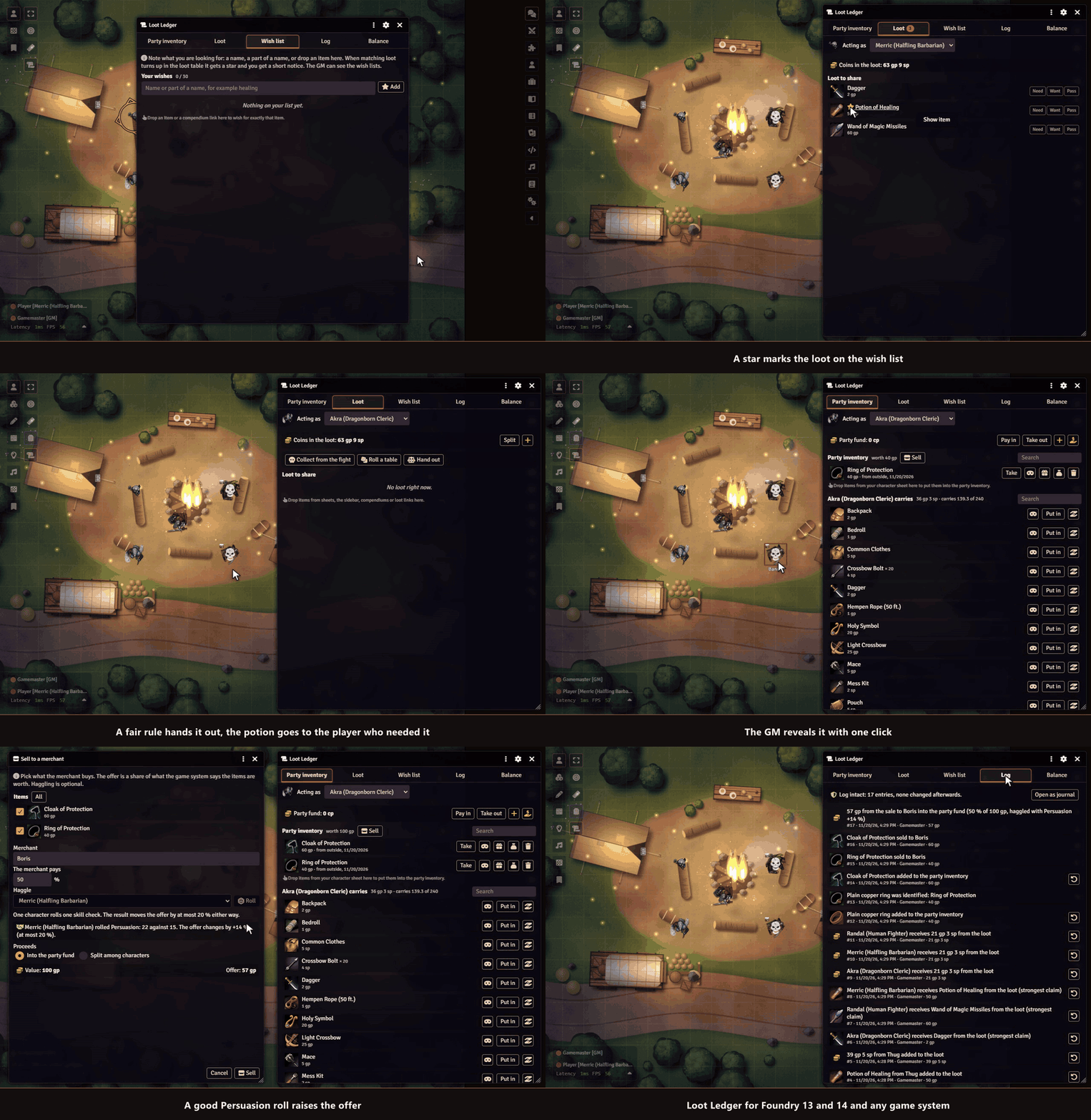
Sephral’s Loot Ledger The dragon is dead and the hoard lies open. Who takes the ring, who carries the rope, and where did the healing potions go? Loot Ledger gives your group one shared party inventory, a fair way to hand out loot and a log everyone can read, so nothing disappears quietly. The demo plays in D&D 5e with heroes and monsters from the SRD. Highlights Unidentified items in every system: give an item a cover name, picture and description. Players see only the cover, in the loot, the log and on their character, until you reveal it or a character passes the check you set. A party inventory that just works: players put things in and take them out with one click or by dragging. Coins go into a shared party fund. Fair loot: after a fight the GM collects what the defeated leave behind. Everyone marks Need , Want or Pass , and the loot goes to the strongest claim, then to whoever received the least, or to the highest roll. Every copper counts: coins are split in equal shares, and the rest goes into the party fund instead of vanishing. An open log: every item and coin that changes hands is written into a journal all players can read. Only the GM's client writes it, and any later change shows up. Clean handovers: equipped or attuned items are taken off on the way, containers keep their contents, and stacks merge. Gifts with consent: a character gives something to a friend, who accepts or declines first. Wish lists and a merchant: players note what they look for, and matching loot gets a star and a quiet notice. The GM sells goods from the party inventory, with an optional haggle roll. Pathfinder 2e works out of the box. Loot from tables and piles: roll a table with quantities like 2d4 or 3d6 gp, or empty an Item Piles pile into the loot. Your table, your rules: free access or GM approval, a fund limit, chat messages for everyone or only the GM. Every part can be switched off. How it works Enable the module. The GM's client creates the party inventory and the loot log on the first start. Open the Loot Ledger from the token controls or the actor directory. After a fight, collect the loot, let the players claim, and hand it out with one click. Good to know A GM has to be online for anything to change hands. Players can still look at everything. Install Search for Loot Ledger in Foundry's module browser or open the package page . Foundry VTT 13 and 14 · built in support for Crucible, D&D 5e and Pathfinder 2e, other systems through a few settings · English and German Learn more Settings, permissions and the support for other systems are explained in the manual . Questions or ideas? Join us on Discord . Looking for more? See all modules by Sephral . License See LICENSE.md .
Sephral’s Module Loadouts
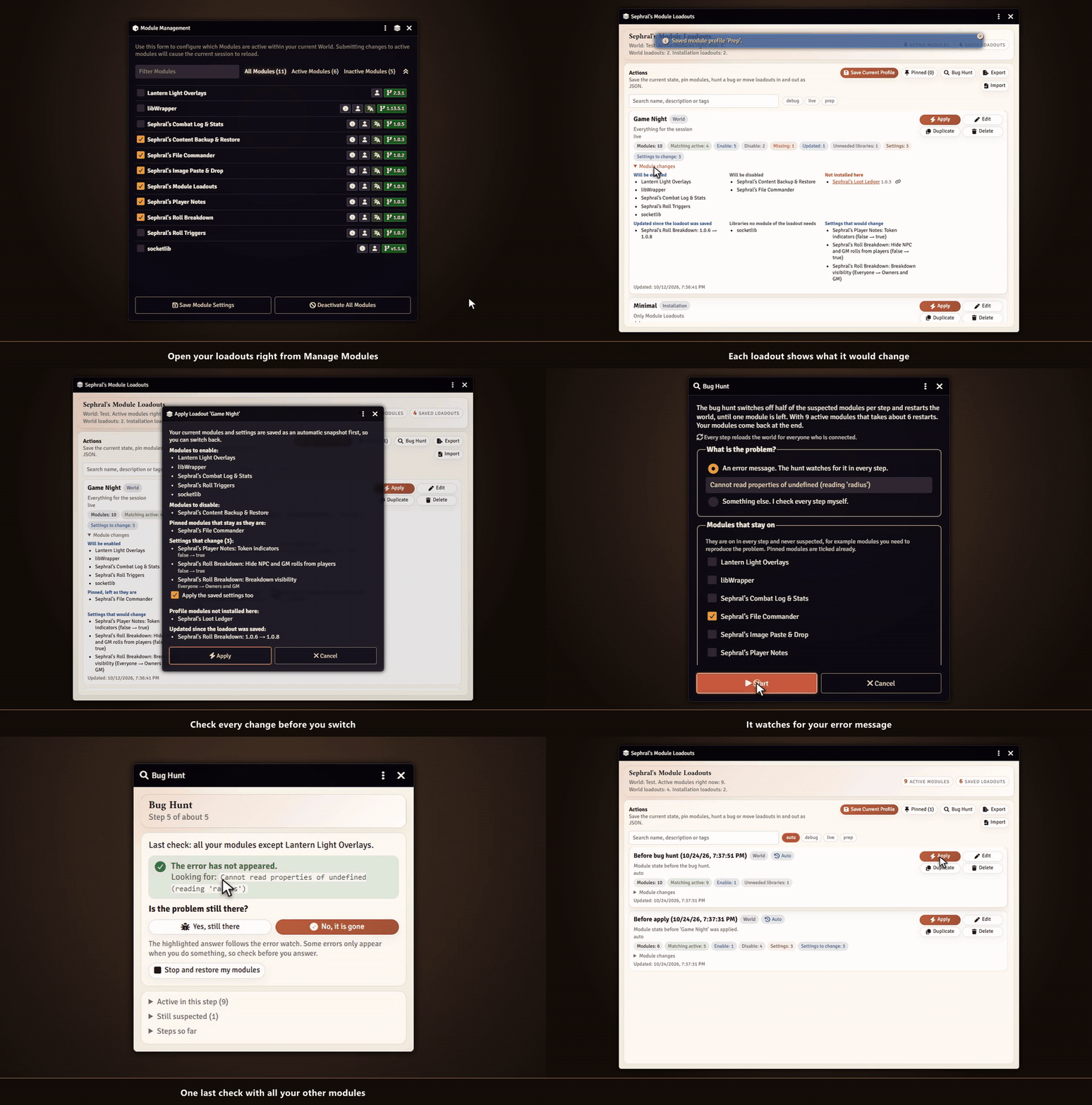
Sephral’s Module Loadouts All modules for game night, a lean set for prep, almost nothing while you hunt a bug. Module Loadouts saves each setup as a loadout and switches between them with one click. If something breaks, it finds the module behind it. Highlights Save your setup: store the active modules as a named loadout with a description and tags. Bring your settings along: a loadout can carry the world settings of its modules. Start a new world, apply your loadout and the modules arrive configured. See before you switch: every loadout shows which modules it would enable, disable or cannot find, which settings would change and which modules were updated since you saved it. Undo included: before every switch your current modules and settings are saved automatically. One click takes you back. Checked after the restart: the next start tells you if a module of the loadout did not come up or threw errors, and offers to undo the switch right there. Bug hunt: something broke and you do not know which module did it? The bug hunt switches off half of the suspects per restart, watches for your error message and names the culprit after a few steps. Your modules come back at the end. Pinned modules: keep your favorites exactly as they are, whatever loadout you apply. No broken worlds: required dependencies are switched on for you, and missing ones stop the switch before anything breaks. Missing modules link to their package page. One world or all of them: keep a loadout in a single world or share it with every world, every gamemaster and every browser of your installation. Stay organized: tags, search, duplicates for variants and a JSON export to back up or share your loadouts, with a preview on import. Right where you need it: open the manager from Foundry's Manage Modules window or from the settings. A hotbar macro switches loadouts too. How it works Open Manage Modules and click the layers icon in its title bar. Save your current setup as a loadout, for example Game Night , with or without its settings. Later, pick a loadout such as Prep , Minimal or Debug and apply it. Install Search for Module Loadouts in Foundry's module browser or open the package page . Foundry VTT 13 and 14 · any game system · English and German Learn more The manual explains world and installation loadouts, settings in a loadout, pinned modules, the bug hunt, the undo snapshots, export and import and the macro API. Questions or ideas? Join us on Discord . Looking for more? See all modules by Sephral . License See LICENSE.md .
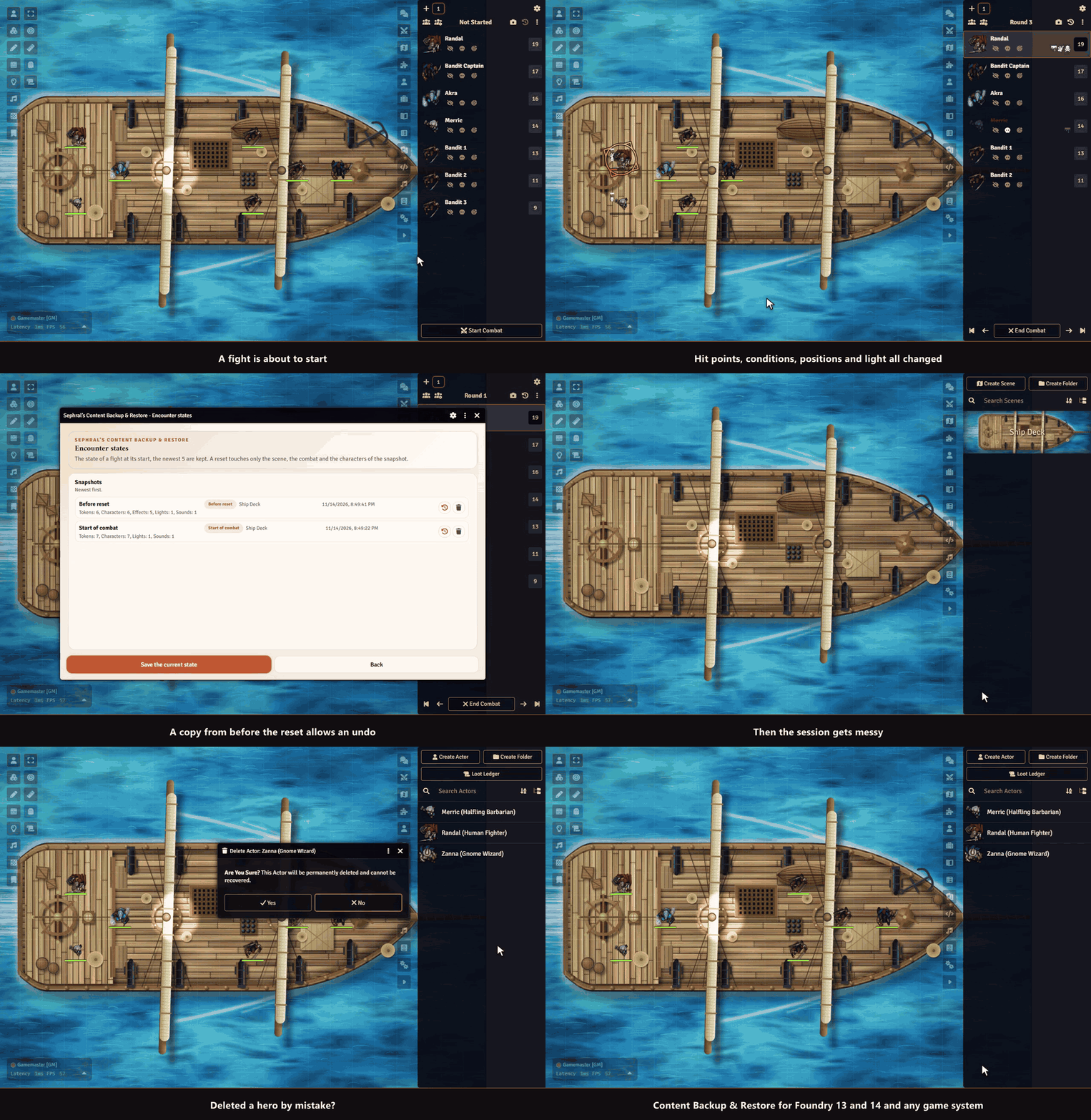
Sephral’s Content Backup & Restore
Sephral’s Content Backup & Restore Deleted the wrong actor? Broke a scene you spent hours on? Get it back in seconds. Content Backup & Restore keeps named backups of your world's content and restores them whenever you need, even after a document was deleted. Highlights One click back to the start of a fight: when a combat begins, the hit points and resources of the fighters, their effects and conditions, token positions, doors, lights and the playing music are saved. A button in the combat tracker puts the scene back for a rerun or after a mistake, with a confirmation first. Linked and unlinked tokens both work, and nothing outside the fight is touched. One right click away: save a named backup of a scene, actor, item, journal entry, playlist, macro, roll table or card stack straight from the sidebar. Restore without regrets: before every restore the current state is saved as a backup too. Changed your mind? Restore that one. Bring back what you deleted: the recovery view lists deleted documents that still have a backup. They return with their original ID, so links, linked tokens and combat entries work again. No surprises after updates: every backup remembers the Foundry and game system version it was made with, and the restore warns you when your world has moved on. All backups in one window: browse, restore, delete and recover everything from one central manager. Automate your safety net: a short macro backs up every scene before each session. The manual has the example. Works on The Forge: backups go to your Assets Library automatically. How it works Right click a document in the sidebar and choose Sephral’s Content Backup & Restore . Name the backup and save it. Need it back? Open the same menu to restore it, or open the manager from the module settings to recover deleted documents. For a fight, just start the combat. The state is saved on its own, and the camera and the back arrow in the header of the combat tracker save it again or bring it back. Install Search for Content Backup & Restore in Foundry's module browser or open the package page . Foundry VTT 13 and 14 · any game system · English and German Learn more The manual covers the settings, the macro API with examples and where backups are stored, also on The Forge. Questions or ideas? Join us on Discord . Looking for more? See all modules by Sephral . License See LICENSE.md .
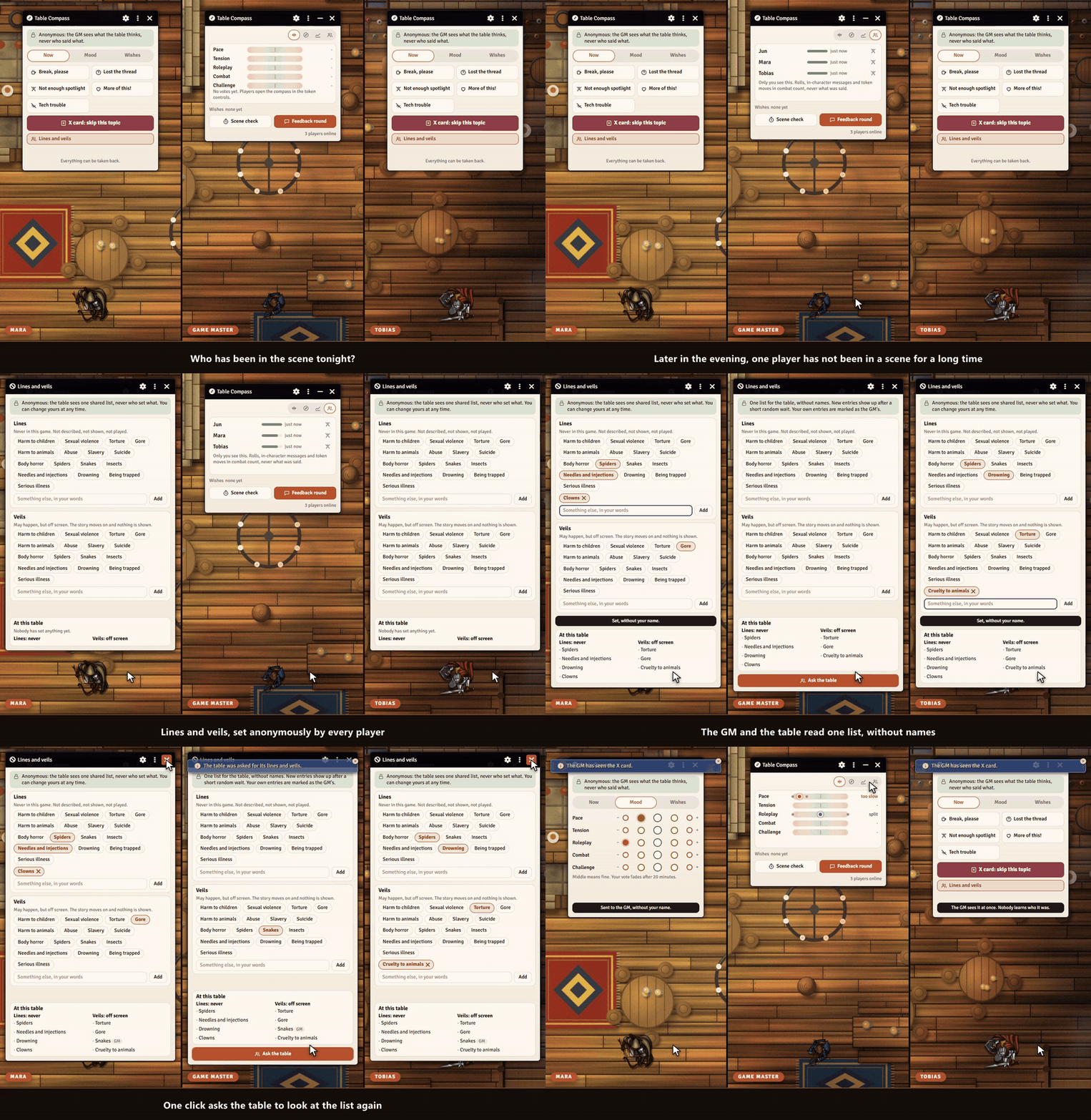
Sephral’s Table Compass
Sephral’s Table Compass Is the pace too slow? Is the horror too much? Does somebody wish for a good fight? Players often feel it but rarely say it out loud. Table Compass lets them tell the GM anonymously, and the GM sees the mood of the table in one small window. Highlights Scales with fine in the middle: pace, tension, roleplay, combat and challenge, and more if the GM likes. Quick signals: a break, lost the thread, not enough spotlight, more of this, tech trouble. And the X card, which reaches the GM at once. Wishes for the next scenes: combat, a puzzle, a character moment, a campfire, loot, intrigue and more. The GM can answer with "coming soon". A small window for the GM: the scales as balances, a compass rose and the history of the evening. Collapsed it is an orb that glows green, amber or red. Scene check: the GM asks "How was the scene?" and the players answer with a face in 30 seconds. Who has been in the scene: per player the GM sees how long ago their character had the spotlight, from rolls, in-character messages and moves in combat, with a soft bar and a gentle hint when someone has been quiet much longer than the others. Lines and veils: at session zero or later the players set lines (never in this game) and veils (off screen) anonymously. Everybody reads one list without names. Feedback round: at the end of the session the players rate the evening, name their highlight and what they want more or less of, and say it in their own words if they like. Anonymous by design: names are never shown or kept, results appear only from two votes on and with a short random delay, and free texts come back in a random order. Being anonymous makes honest feedback more likely. How it works Enable the module. Players open the compass from the token controls and say what they feel, whenever they feel it. The GM keeps the small window or the orb in a corner and starts the feedback round at the end of the session. Good to know A GM has to be online to receive the votes. What players say while no GM is there goes out as soon as one joins. Only the spotlight view names players: it counts what the GM sees anyway, keeps no texts and can be switched off. Install Search for Table Compass in Foundry's module browser or open the package page . Foundry VTT 13 and 14 · any game system · English and German Learn more The scales, the signals, the anonymity and the settings are explained in the manual . Questions or ideas? Join us on Discord . Looking for more? See all modules by Sephral . License See LICENSE.md .
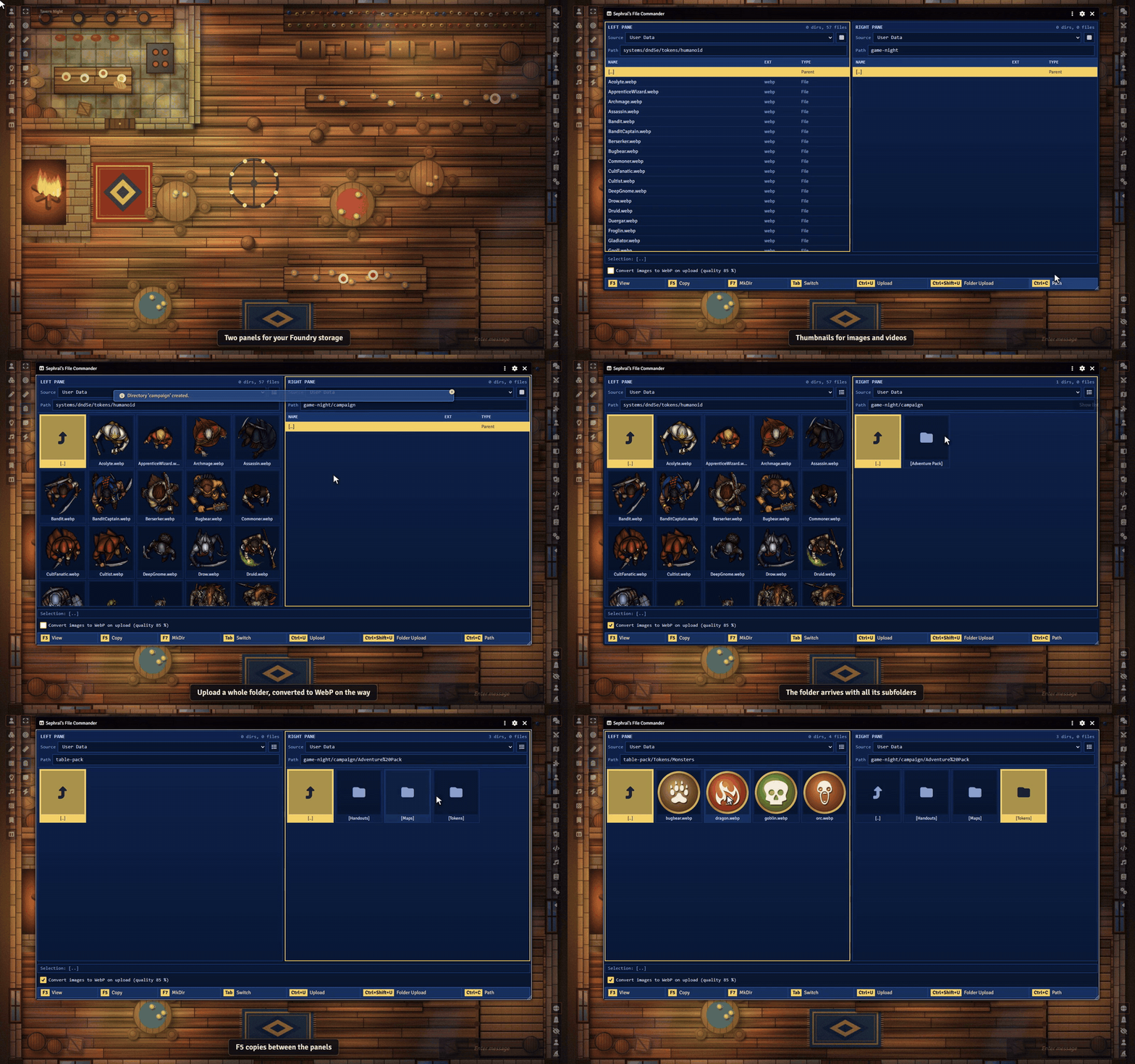
Sephral’s File Commander
Sephral’s File Commander Foundry's file picker is made for picking a file. File Commander is made for managing them. Two panels side by side, full keyboard control and copying between folders, just like the classic commanders. Highlights Two panels, one view: browse two folders side by side, for example your asset collection on the left and your world on the right. Copy whole folders: copy single files or complete folder trees from one panel to the other. Before anything gets overwritten, it asks. Keyboard first: arrow keys, Enter, Tab and the classic F keys. F3 views, F5 copies, F7 creates a folder. Upload where you are: upload files or whole folders from your computer straight into the active panel, drag them in from the desktop, and let images become smaller WebP files on the way. Thumbnails: switch a panel to a grid of thumbnails for images and videos. Look before you use: images and videos open in Foundry's image viewer, audio files play in a small player. Copy the path, paste it anywhere: Ctrl+C copies the path the way Foundry expects it, ready for token images, tiles or playlist sounds. Everywhere Foundry runs: User Data, Public, S3 and the Assets Library on The Forge. How it works Click the File Commander icon in the scene controls on the left, or open it from the module settings. Pick a folder in each panel. Select, copy, upload. Done. Good to know Foundry does not let modules delete, move or rename files during a game session. File Commander sticks to what works safely everywhere: browse, copy, upload and create folders. Install Search for File Commander in Foundry's module browser or open the package page . Foundry VTT 13 and 14 · any game system · English and German Learn more The manual lists every hotkey and setting, the permissions players need and how it works on The Forge. Questions or ideas? Join us on Discord . Looking for more? See all modules by Sephral . License See LICENSE.md .
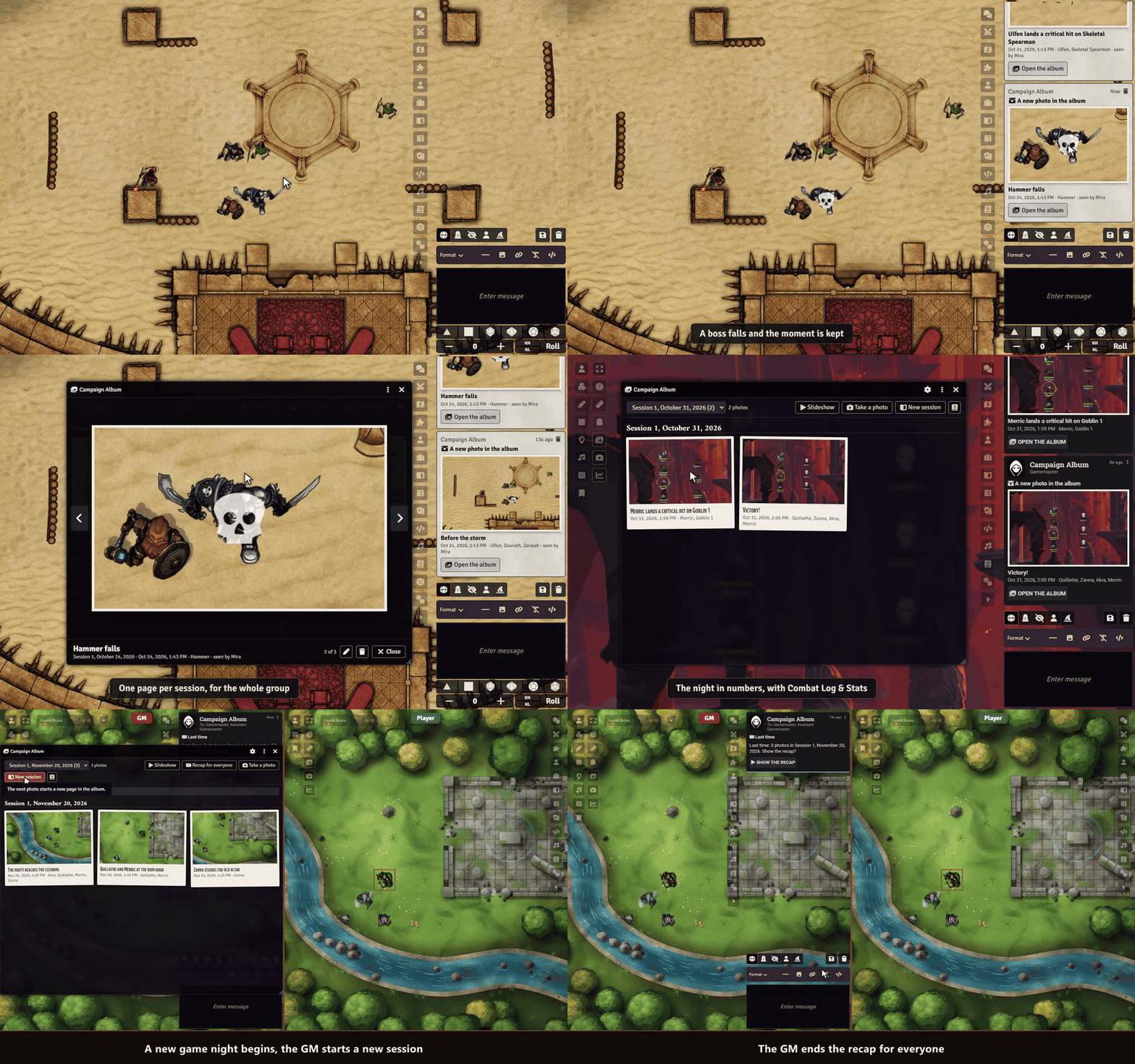
Sephral’s Campaign Album
Sephral’s Campaign Album The critical hit that ended the dragon. The last stand at the bridge. The night the bard reached level five. Campaign Album keeps those moments as photos, exactly as your players saw them, and fills a scrapbook of your campaign session by session. The demo uses heroes, adversaries and the arena map of Crucible's playtest adventure. The night in numbers shows the premade heroes of the D&D 5e system. Highlights Photos that take themselves: critical hits, fallen bosses, victories, farewells, level ups and the sunrise of a new day are captured the moment they happen. A limit per session keeps every photo special. Through your players' eyes: each photo shows what a player of a character in the picture saw, with their light, their vision and their fog of war. Hidden enemies and secret corners stay hidden. A clean picture: no selection frames, rulers or wall handles in the photo, and nobody's view jumps around while it is taken. A scrapbook for the whole group: one page per session in a journal everyone can read, with captions, dates and who was there. The night in numbers: with Sephral’s Combat Log & Stats each session page also tells the fights, the damage and the hero of the night. Slideshow: relive the campaign at the end of an evening, or let the GM show the photos of the last session when a new one starts. Players take photos too: the camera button sends their view to the GM, who adds it with one click, or straight into the album if you like. You stay in charge: choose the moments, the limit and whose eyes count, edit captions or take photos out at any time. How it works Enable the module. The GM's client creates the album on the first start. Play. Great moments land in the album on their own, and the camera button in the token controls takes a photo whenever you want. Open the album from the token controls or the journal directory, browse the sessions or start the slideshow. Good to know A GM has to be online for photos to be stored. The photos are images in your world folder, on The Forge in your Assets Library. Install Search for Campaign Album in Foundry's module browser or open the package page . Foundry VTT 13 and 14 · any game system, built in support for Crucible and D&D 5e · English and German Learn more Settings, the moments per system and the storage are explained in the manual . Questions or ideas? Join us on Discord . Looking for more? See all modules by Sephral . License See LICENSE.md .
Sephral’s Crucible Sheet & Quickbar
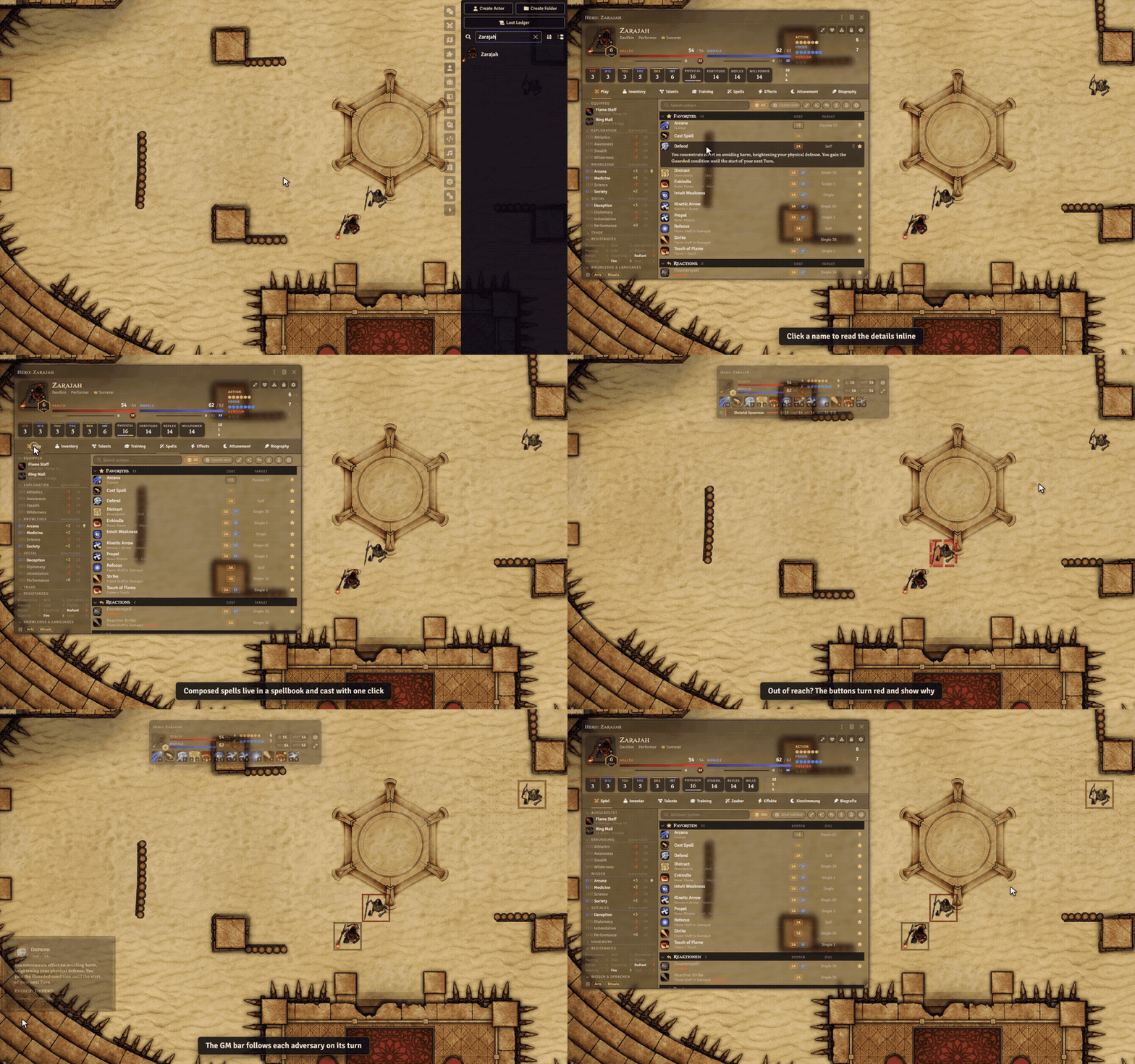
Sephral’s Crucible Sheet & Quickbar Everything your Crucible hero can do, on one compact sheet. And when the fight starts, it shrinks into a quickbar that stays on the map. The demo uses Zarajah, one of Crucible's pregenerated heroes, and the arena of Crucible's playtest adventure. Dense lists, a play and an edit mode, search and inline details, all in Crucible's own look. For heroes and adversaries alike. Highlights Everything in view: health, wounds, morale, defenses, action, focus and heroism always sit in the header. No more switching tabs in the middle of a turn. The quickbar: double click the title bar and the sheet becomes a small, translucent bar that stays open on the map. Favorites, spells and pinned skills, one click each. The right action, fast: searchable action lists with cost chips and a usable now filter that hides what you cannot pay right now. Hover an action to see which pips it costs. A spellbook for composed spells: save your favorite combinations of rune, gesture and inflection and cast them again with one click. Made for combat: your quickbar opens when your turn begins and tells you when you are next. Targeted tokens show their defenses, distance and conditions, and actions that cannot reach them are marked. A combat bar for the GM: on an adversary's turn its quickbar opens in a fixed spot and moves on to the next adversary. Your sheet, your choice: every user decides which characters open in it. One player can use it without changing anything for the others or the GM. Your look: dark and light theme, transparent, solid, Crucible or Ember codex backgrounds and a compact mode. How it works Enable the module in your Crucible world. The GM is asked once whether it should be the standard sheet for everyone. Or right click your character in the actor directory and choose Use Sheet & Quickbar (just for me) . Double click the title bar to switch between the full sheet and the quickbar. Everyone can still switch single characters back to Crucible’s own sheet. Install Search for Crucible Sheet & Quickbar in Foundry's module browser or open the package page . Foundry VTT 14 · Crucible 0.11 or newer · Ember optional, it adds the Attunement tab and the Ember codex background · English and German Crucible is still before 1.0 and changes between versions. After an update the GM gets a notice and can run a self test from the module settings that checks every sheet. Formerly known as Crucible Folio . Your settings and spellbooks move over on the first start. Learn more The manual lists every shortcut and setting and explains the quickbar, the combat helpers and the spellbook in detail. Questions or ideas? Join us on Discord . Looking for more? See all modules by Sephral . License See LICENSE.md .
Sephral’s Vista Portrait Switcher
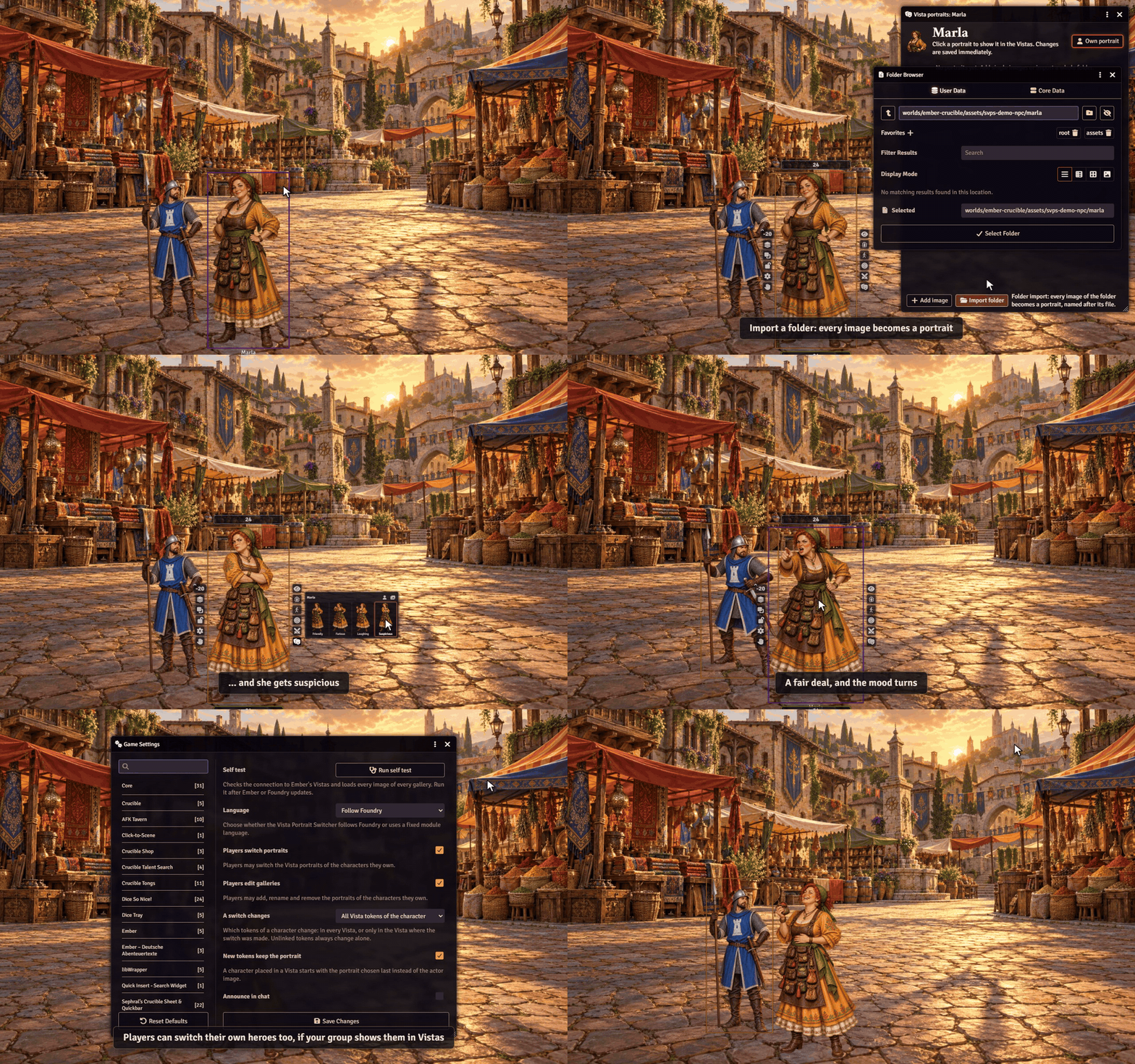
Sephral’s Vista Portrait Switcher Bring the NPCs in Ember's Vistas to life. The merchant turns suspicious, the guard reaches for his sword, the innkeeper bursts out laughing. One click, and the figure changes with a soft transition, right in the middle of the conversation. The demo uses its own characters and market backdrop instead of Ember's artwork. Highlights Moods at a click: right click an NPC in a Vista and pick a portrait from the palette in the token HUD. The palette stays open for the next change. A gallery per character: as many portraits as you like, for moods, outfits, poses or disguises. Name them, sort them, mirror them. Set up in seconds: import a whole folder at once, or let the gallery suggest matching images such as merchant_angry next to merchant . That also finds the extra portraits Ember already ships for some NPCs. Fits any figure: every portrait can have its own height, so kneeling or sitting figures keep the right size and their place in the Vista. Whole crowds: every guard of a squad can show a different mood. Remembers the choice: a character keeps its portrait, and new tokens in a Vista start with it. Soft transitions: fade, swirl, morph, hologram and more. Heroes too: groups who place their heroes in Vistas can let players switch their own portraits. How it works Right click an NPC in the actor directory and choose Vista portraits . Add images, import a folder or let the gallery suggest alternates. In a Vista, right click the NPC, click the mask button in the token HUD and pick a portrait. Everyone sees the change right away. Install Search for Vista Portrait Switcher in Foundry's module browser or open the package page . Foundry VTT 14 · Ember with Crucible or D&D 5e · English and German The module needs your copy of the Ember module and contains no Ember content itself. On scenes that are not Vistas it stays out of the way. After an update of Ember or Foundry the GM gets a short notice, and a self test in the module settings checks that everything still works. Tip: portraits look best as transparent full body figures with the feet at the lower edge, like Ember's own Vista portraits. Learn more Every setting, the self test and the macro API are in the manual . Questions or ideas? Join us on Discord . Looking for more? See all modules by Sephral . License See LICENSE.md .
Sephral’s Crucible Combat Pulse
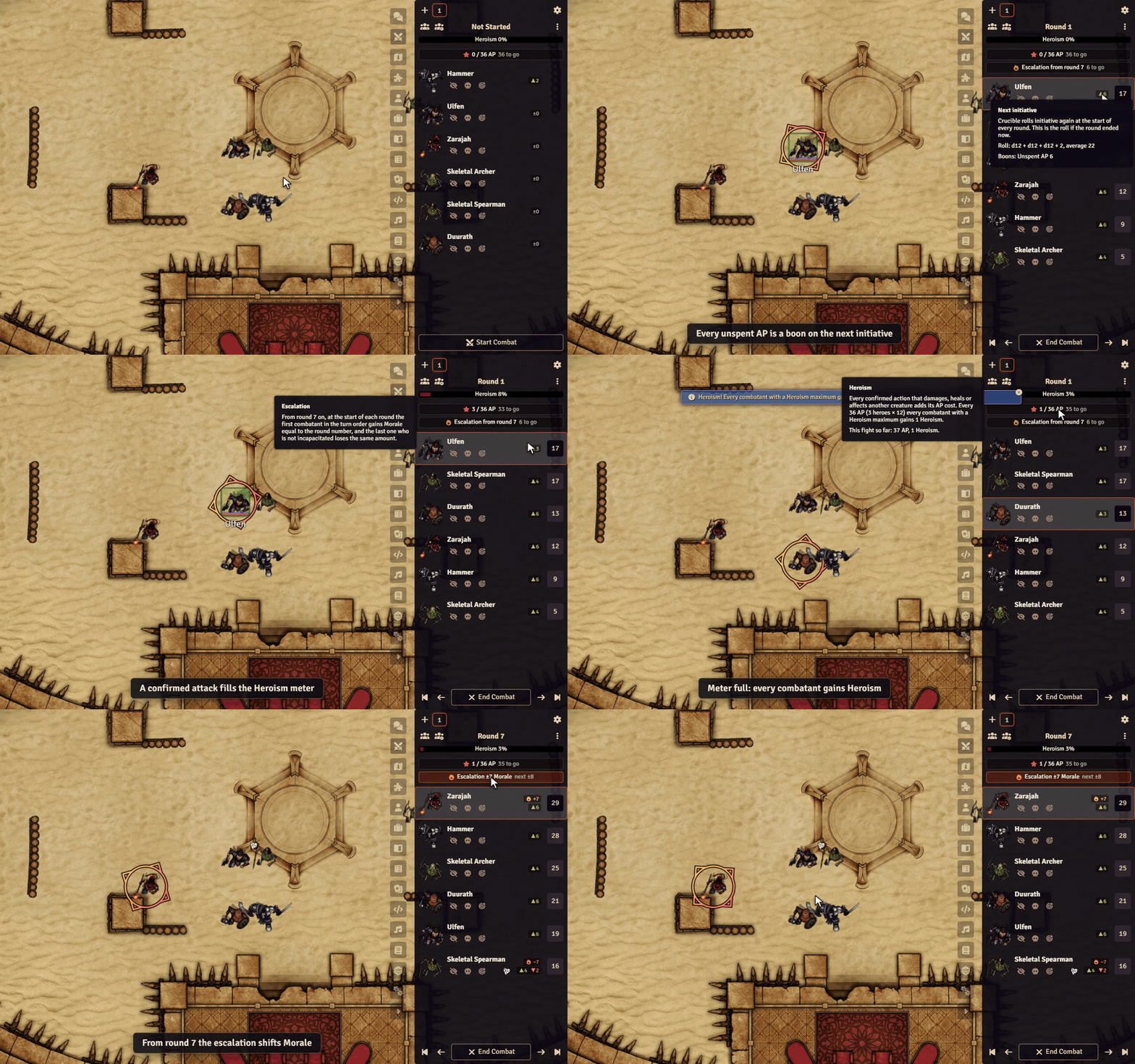
Sephral’s Crucible Combat Pulse Crucible fights have a pulse nobody at the table can see. Combat Pulse puts it into the combat tracker. How close is the next Heroism point? When does the Morale escalation hit? Who acts first next round? Your players can plan around it, and you no longer have to count. The demo uses three heroes, three adversaries and the arena map of Crucible's playtest adventure. Highlights Heroism in numbers: below Crucible's Heroism meter the tracker shows exactly where the party stands, for example 14 / 24 AP, 10 to go . Heroism alert: when the meter is full it flashes, and everyone learns that the heroes gained a point. Escalation at a glance: a countdown to round 7, then the current and the next amount. Badges show who gained or lost Morale, even after someone delays. Initiative forecast: Crucible rolls initiative every round. A badge next to each combatant shows the boons and banes of the next roll if the round ended now: unspent AP, slow weapons, bulky armor, Broken, ranks and talents. Hover for the dice and the average. No spoilers: the forecast reveals unspent AP, so the GM decides who sees it. By default everyone sees it for heroes and only the GM for adversaries. Hands off your game: the module never rolls dice and never changes an actor or a roll. It only shows what Crucible already knows. How it works Enable the module in your Crucible world. Start a fight. Heroism, escalation and the forecast appear in the combat tracker, in the sidebar and in the popout. Click the gear next to the Heroism numbers to choose what you see. Every user decides for themselves. Install Search for Crucible Combat Pulse in Foundry's module browser or open the package page . Foundry VTT 14 · Crucible 0.11 · English and German Crucible is still in development. After an update of Crucible or Foundry the GM gets a short notice, and a self test in the module settings checks that everything still works. Learn more Every setting, the self test and the macro API are in the manual . Questions or ideas? Join us on Discord . Looking for more? See all modules by Sephral . License See LICENSE.md .
Sephral’s Update Guard
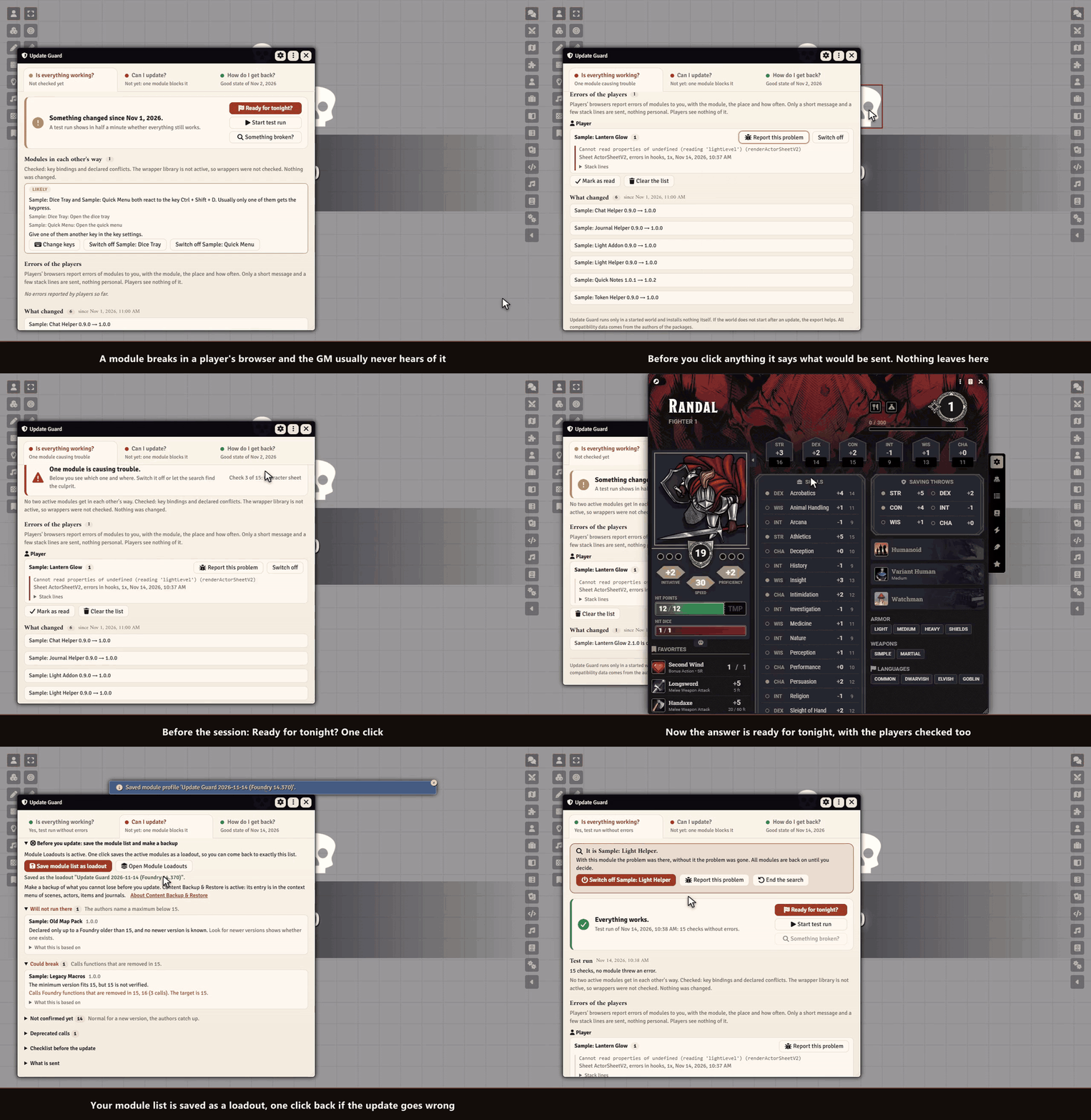
Sephral’s Update Guard Is my world ready for tonight? One click answers it for you and your players. If something broke, Update Guard finds the module behind it, helps you report it, and shows you what is ready for the next Foundry and how to get back. Highlights Ready for tonight? One click before the session: a test run, the errors your players had, and whether their browsers run your versions. One answer, one next step. Errors of your players: a module breaks in a player's browser and you hear about it, with module, player and place. Nothing personal is sent. Report in one step: Update Guard checks on your click whether the problem is known on GitHub and writes a ready bug report. Modules in each other's way: two modules on the same key, modules their authors say do not work together, two modules that replace the same part of Foundry. One sentence with both names and what to do. Test run: one click opens what a game night opens and closes it again. You see which module threw an error and where. Your world is not changed. Find the module: the search narrows it down in a few rounds, and everything is as it was. Can I update? Pick a Foundry version and see in one sentence what stands in the way. Save your module list before you update. What changed and the way back: every change with its changelog, the last state that worked, and the steps back. How it works Enable the module. Before the session click Ready for tonight? . After an update the window opens by itself. All good? Play. Something wrong? Report it, switch the module off or let the search find it. Good to know Update Guard runs only in a started world and cannot install or roll back anything, because Foundry does that on its setup screen. It shows the way. Verified means what the author wrote into the manifest, no promise that nothing breaks. Only the GM sees the windows. Install Update Guard is not in Foundry's module search. Copy this link: https://github.com/Sephral/sephrals-update-guard/releases/latest/download/module.json In Foundry's setup screen open Add-on Modules and click Install Module . Paste the link into Manifest URL at the bottom of the window. Click Install , then enable the module in your world. On The Forge open the Bazaar, click Install From Manifest and paste the link. Foundry VTT 13 and 14 · any game system · English and German Learn more What each rating means, what the players' browsers and the online check send, and every setting are explained in the manual . Questions or ideas? Join us on Discord . Looking for more? See all modules by Sephral . License See LICENSE.md .
Sephral’s Handout Lens
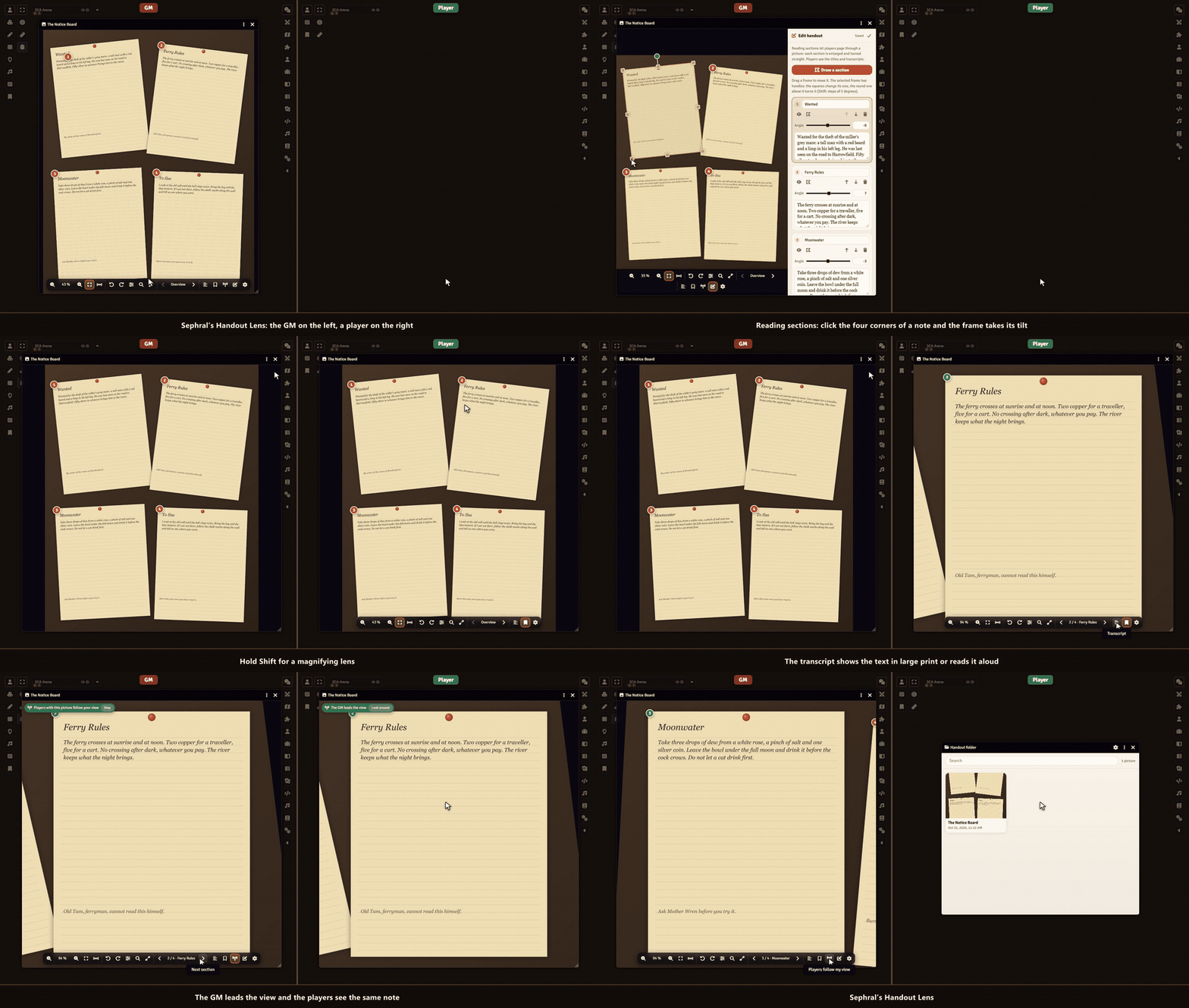
Sephral’s Handout Lens The GM shows a letter, four torn diary pages or an old map, and the writing is too small to read. Handout Lens turns every shown picture into something players can actually read: zoom in, hold Shift for a magnifying lens, page through the notes one by one and keep every handout in a folder. Highlights Zoom where you point: mouse wheel, trackpad pinch, two fingers on a tablet, double click or keys. Up to 800 % and back to the whole picture with one click. A magnifying lens: hold Shift and a round lens follows the mouse. The wheel changes its strength. Reading aids: contrast, brightness, grayscale, light on dark and a turn by any angle, so faded or tilted writing becomes readable. Reading sections: the GM frames each note once. Players page through them, and every note fills the window, turned straight. Transcripts read aloud: the GM can add the text of each note. Players read it in large print beside the picture or let the browser read it to them. Follow the GM: the GM zooms to a detail and every player with the picture open sees the same. Players can look around alone and follow again with one click. A handout folder for every player: each picture the GM shows lands in the player's folder, ready to open again next session. Players who join late get the picture the GM just showed. Reading mode: full screen, nothing but the picture. How it works Enable the module. Every image window in Foundry now has a toolbar at the bottom. Show a picture to your players as usual, with the eye button of an image or a journal page. Optional: click the pencil in the toolbar, draw a frame around each note and type its transcript. Good to know Writing stays blurry when the picture itself has too few pixels, and the GM gets a note when a shown picture is that small. While another module that zooms Foundry's image windows is active, Handout Lens leaves those windows to it. Install Search for Handout Lens in Foundry's module browser or open the package page . Foundry VTT 13 and 14 · any game system · English and German Learn more The toolbar, the keys, the reading sections and the settings are explained in the manual . Questions or ideas? Join us on Discord . Looking for more? See all modules by Sephral . License See LICENSE.md .
Sephral’s Deep Tables
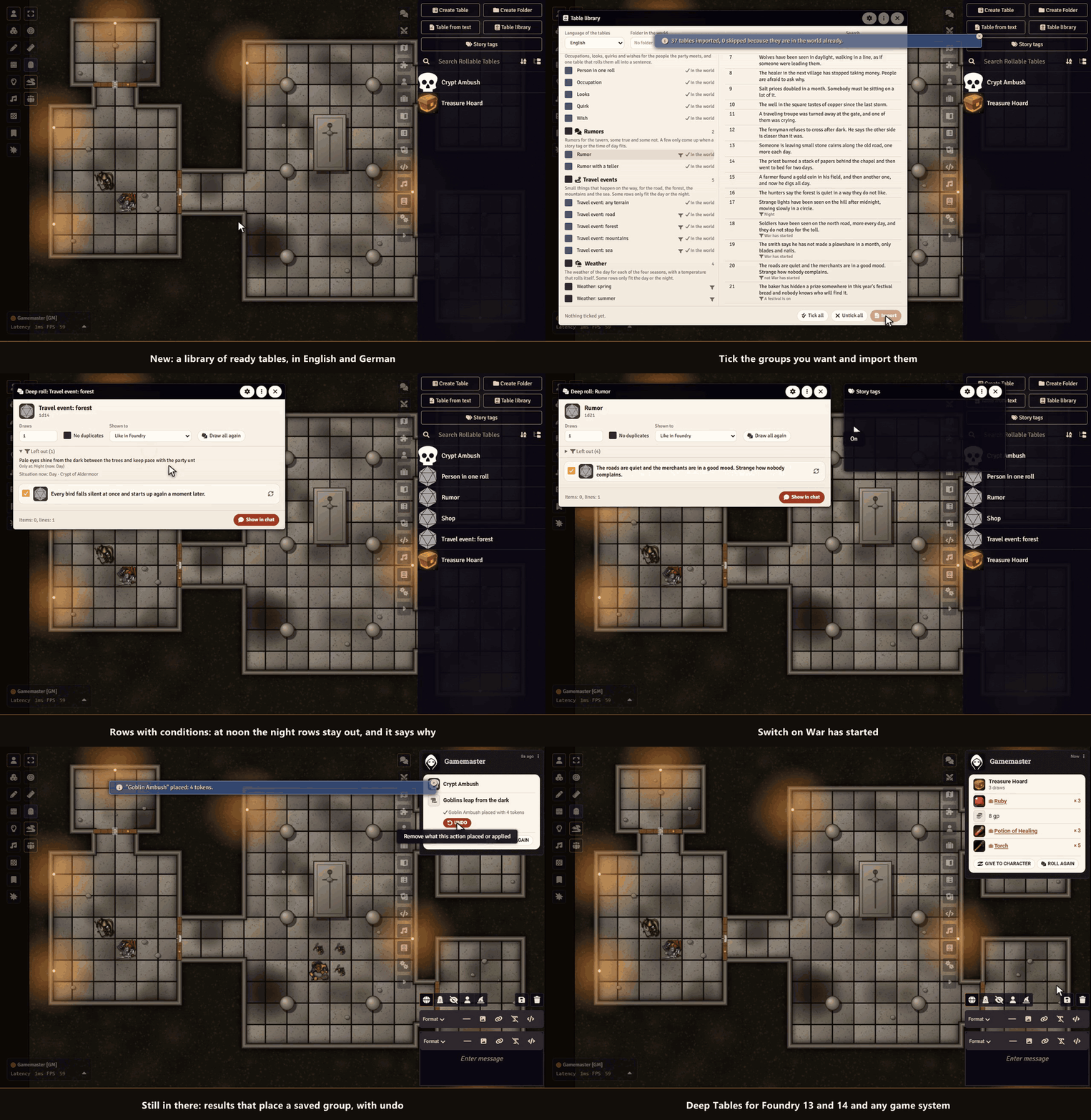
Sephral’s Deep Tables You roll on the treasure table and get "a chest". So you roll on the chest table, then on the gem table, then for how many gems, and you write it all down for the players. Deep Tables does it in one go: tables inside tables, quantities like 2d4+1 and one clear card, and a click puts the result where it belongs. Highlights Table library: 36 ready tables for names, inns, rumors, travel, weather, encounters and loot, in English and German. Preview, then import a group. Rows with conditions: a row only comes up at night, in the right scene or Region, for the right level or when a story tag is on. The deep roll window says why a row was left out. Results that act: a result can place a saved group of monsters, put tokens on the map, play a sound, show a handout or run a macro, with undo. Tables with a memory: a table remembers what it gave, even after a restart. Tables for your players: release a table and they roll it from their chat. A natural 20 that rolls a table: with Roll Triggers by Sephral, a critical hit table rolls by itself. Deep roll: look at the result before anybody sees it. Untick rows, change a quantity, draw one row again. Tables inside tables: a result that points to another table is rolled on, as often as its quantity says. Quantities and draws: formulas like 2d4+1, several draws, no duplicates, and dice or tables rolled right inside a sentence. One clear card: a click gives it to a character, a loot pile or the Loot Ledger, and a small hint tells you where the Loot Ledger would add a button. Table from text: paste a list and get a roll table. How it works Right click a roll table and choose Deep roll or Draw now . Change what you like, then click Show in chat . On the card click Place , Give to character or whatever the result offers. Good to know Saved Encounters and Roll Triggers by Sephral add encounter placing and triggers. The rest works without them. Only the GM runs actions. Install Deep Tables is not in Foundry's module search. Copy this link: https://github.com/Sephral/sephrals-deep-tables/releases/latest/download/module.json In Foundry's setup screen open Add-on Modules and click Install Module . Paste the link into Manifest URL at the bottom of the window. Click Install , then enable the module in your world. On The Forge open the Bazaar, click Install From Manifest and paste the link. Foundry VTT 13 and 14 · any game system · English and German Learn more Every button, setting and the macro API are explained in the manual . Questions or ideas? Join us on Discord . Looking for more? See all modules by Sephral . License See LICENSE.md .
Sephral’s Map Pins
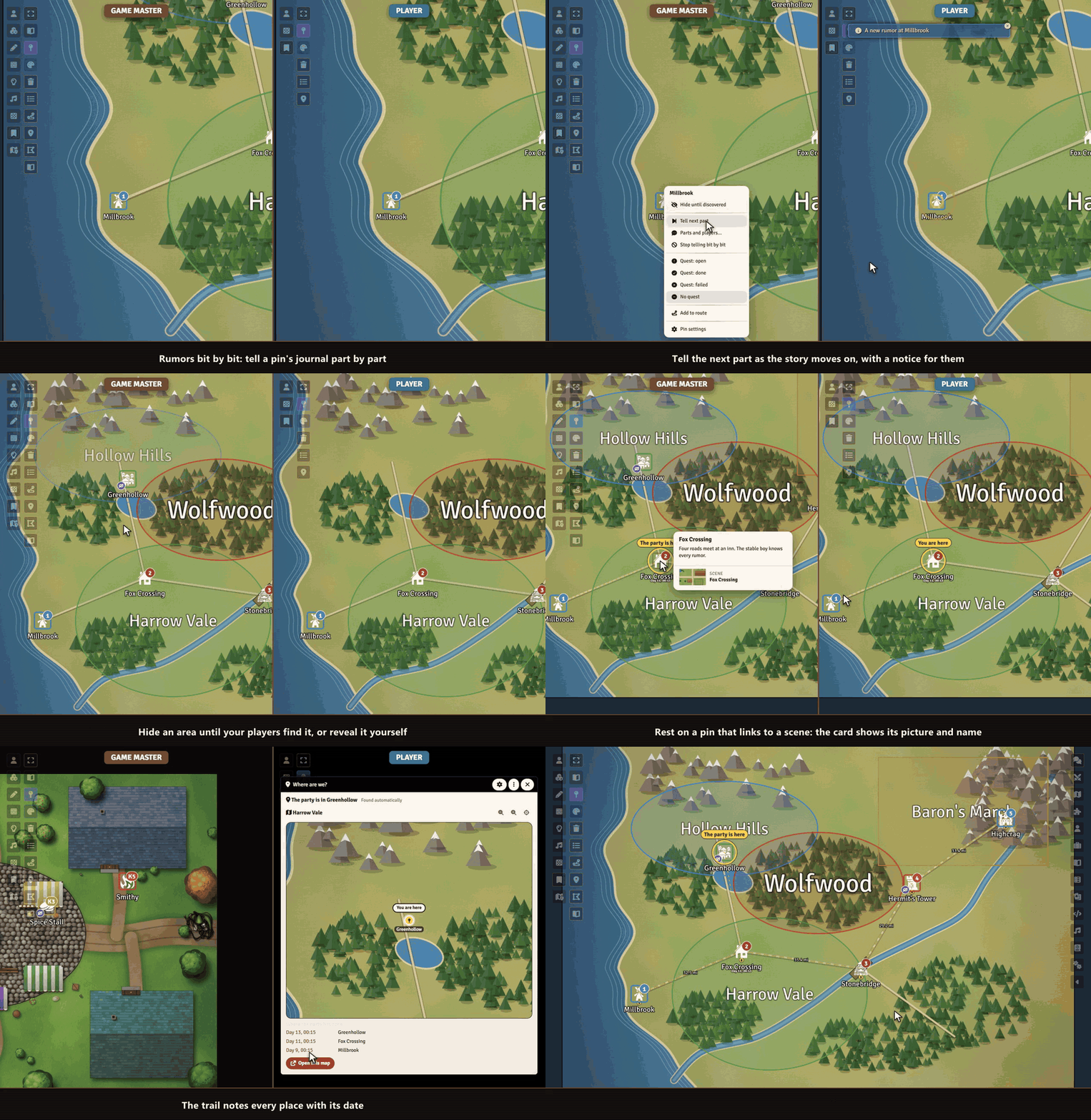
Sephral’s Map Pins Pins on a big map you can finally read: names that stay visible, numbers that count up, a preview when you point at one, pins your players discover, quest marks, routes, the party's place on the map and labeled realms. Highlights Where are we? The pin of the party's place lights up on your overland map. From inside a town or a dungeon, one click shows the map above, with a trail of dates. Areas: a realm or a danger zone with a large label in its category color and a journal preview. Hide it until your players explore it. Rumors bit by bit: tell a pin's journal part by part. Players see only what you told, with a new mark and a notice. Pins you discover: hide a pin until your players find it, by exploring its place or by your reveal. Quest marks: open, done or failed, on the pin and in the list. Map key: one click makes a handout with a page per numbered pin. Routes and travel time: pick pins in order to see distance and time, and share the route with your players. Readable pins: labels that stay visible, no dark box, a steady size while zooming, numbers like 12 or B3 , category rings. Preview on hover: title, picture, a thumbnail of the linked scene and the first lines of the journal, for players too, within their rights. Pin list: search and filter every pin of the scene. Pins by players: players click the map to add a pin, and you confirm. Scene links: a double click on a pin switches to another scene. Bring your old pins: one button takes over the look of your old pins. Everything works on normal Foundry notes and drawings. Switch the module off and your pins are still there. How it works Enable the module. Open a pin's note settings and look at the new section Map Pins , or click Pin list in the notes controls on the left. Set the look for the whole world in the module settings, and change single pins when they need to differ. Install Map Pins is not in Foundry's module search. Copy this link: https://github.com/Sephral/sephrals-map-pins/releases/latest/download/module.json In Foundry's setup screen open Add-on Modules and click Install Module . Paste the link into Manifest URL at the bottom of the window. Click Install , then enable the module in your world. On The Forge open the Bazaar, click Install From Manifest and paste the link. Foundry VTT 13 and 14 · any game system · English and German Learn more Every setting and the macro API are explained in the manual . Questions or ideas? Join us on Discord . Looking for more? See all modules by Sephral . License See LICENSE.md .
Sephral’s Swift Dice
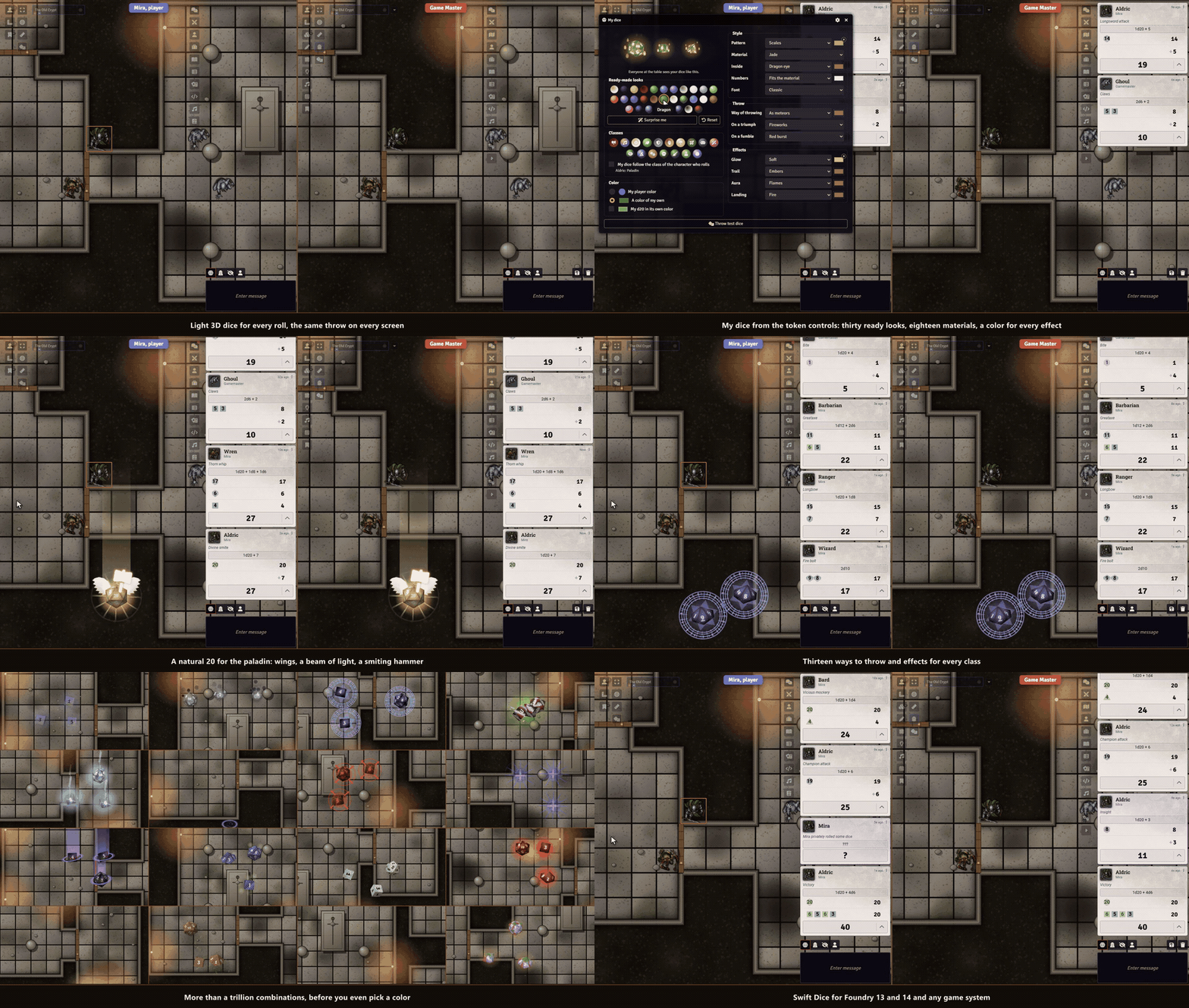
Sephral’s Swift Dice The rogue rolls for the backstab and everyone leans in. Then the laptop of one player stutters, the chat card shows up late or not at all, and the moment is gone. Swift Dice throws light 3D dice for every roll that never hold up the game. Highlights The result never gets lost: the chat card appears at once and shows its result when the dice lie still. Every screen sees the same throw, so nobody gives the result away early. Your color, your dice: dice take each player's Foundry color. My dice offers materials from glass to lava, patterns, a color for every effect, forty-two ready looks and a look of its own for each character. Big or small: choose how big the dice are in My dice . Dice for every class: the druid's dice ride a gust of wind, the paladin's wear wings, the barbarian's make the table quake. Seventeen class looks, or dice that follow the class of whoever rolls. Thirteen ways to throw: from a hand, a cup, a cannon or a bow, through a portal, as meteors and more, clicking in the sound of their material if you like. Light and magic: trails of sparks, runes or bats, auras from a halo to tentacles, landings in holy light or a shower of arrows, glass dice with a beating heart inside. Big moments that fit your game: not every game counts a 20 as good. The game system decides what a triumph is, from a D&D critical range to 01 in Call of Cthulhu, or the GM sets a rule. Light enough for every table: no WebGL, no physics engine. The dice run on old laptops, tablets and in Firefox, beside the chat. Secret rolls stay secret: blind rolls show covered dice to the one who rolled, private rolls nothing to the others. Every die from d4 to d100, any system, Midi QOL and Ready Set Roll. How it works Enable the module. Every roll now throws dice in the color of its player. Click the dice button in the token controls on the left to give your dice a look of your own, or the look of your class. As GM, pick in the settings how fast the dice roll and which rolls they show. Good to know Swift Dice stays off while Dice So Nice is active, so nobody sees two sets of dice. Install Search for Swift Dice in Foundry's module browser or open the package page . Foundry VTT 13 and 14 · any game system · English and German Learn more Every setting, the window My dice and the macro API are explained in the manual . Questions or ideas? Join us on Discord . Looking for more? See all modules by Sephral . License See LICENSE.md .
Sephral’s Lunar Almanac
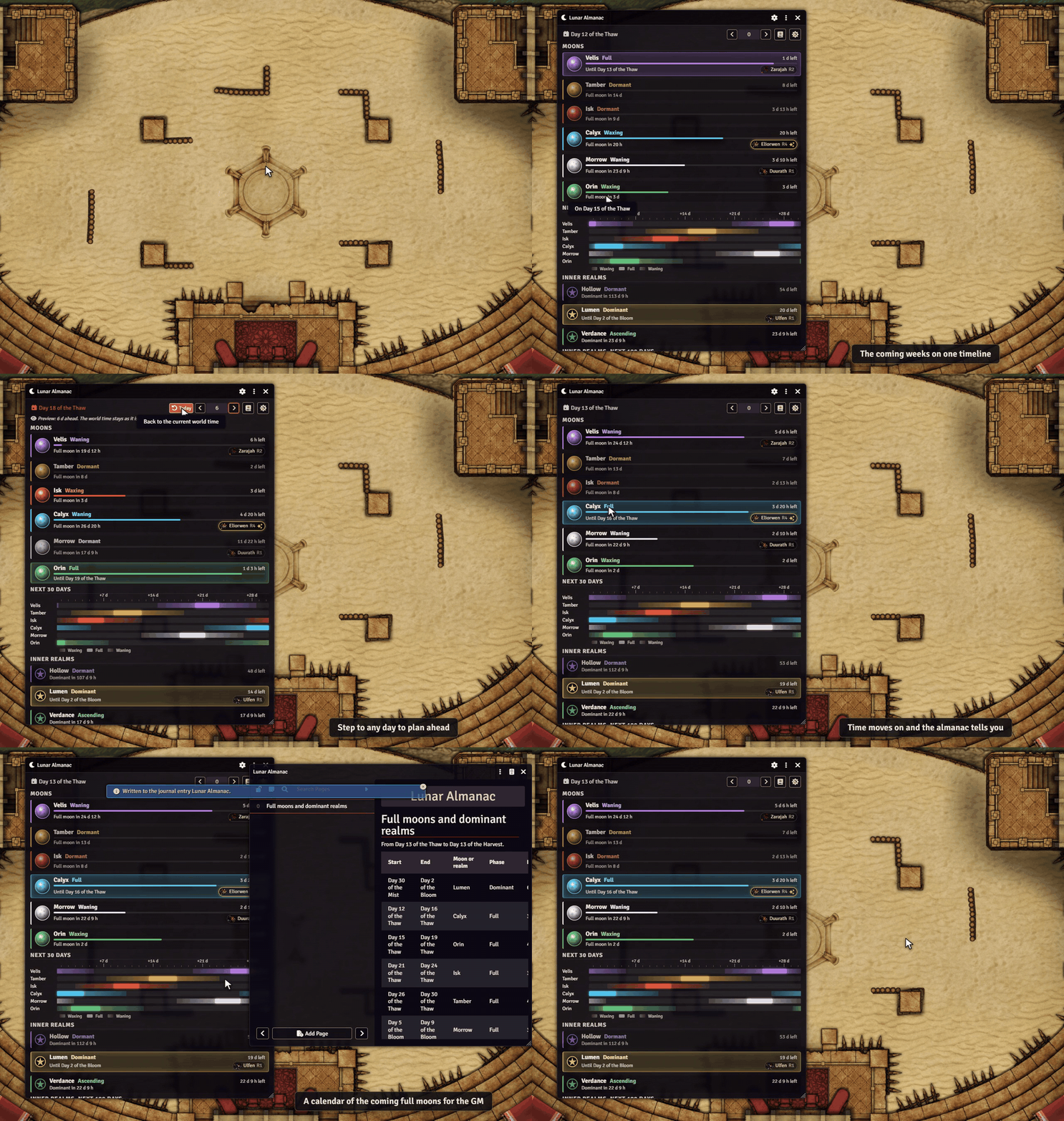
Sephral’s Lunar Almanac Moons and inner realms circle above Ember, and your heroes are bound to them. When does the next full moon rise, and who is waiting for it? Ember's calendar shows where the moons stand today. Lunar Almanac shows what comes next. The demo uses an invented sky with its own names, colors and moon images. In your world the almanac shows Ember's own sky. Highlights Every moon at a glance: phase, influence, how long the phase lasts and when the next full moon comes. Full moons glow, and the inner realms show when each of them becomes dominant. Plan ahead: a timeline of the coming 30 days with a strip per moon, so you see at once when two moons are full together. The slow inner realms get a strip of half a year. Your heroes in the sky: every moon and realm lists the heroes of your party attuned to it, with their rank. Blessed heroes glow golden. Click a hero to open the sheet. Gear that answers the moons: items that react to a moon show a small moon next to their hero and light up while that moon is full. The GM can mark any other item too. Weather at a glance: the weather where the party is and the wind, straight from Ember. The GM also sees how the wind will turn. Recharge at the full moon (D&D 5e): an item can recover its uses at the full moon of a chosen moon or when a realm becomes dominant, right in the recovery settings of D&D 5e. Never miss a full moon: when time moves on, everyone learns which moon became full. After a long rest or a journey one message sums up everything that happened in between. A calendar for the GM: one click writes the coming full moons and dominant realms into a journal only the GM can see. The almanac itself never changes the time, the moons or the attunements. How it works Enable the module in your Ember world. Click the moon button next to the cosmos button of Ember's calendar, or the moon tool in the token controls. Step to another day with the arrows next to the date to see when the next full moons come. Players and the GM see the same sky. Players only see the heroes they are allowed to see. Install Search for Lunar Almanac in Foundry's module browser or open the package page . Foundry VTT 14 · Ember 0.6.3 with its adventure scenes · English and German The almanac needs your copy of the Ember module and contains no Ember content itself. It is tested with Crucible and with Ember's D&D 5e mode. Learn more Every setting and the macro API are in the manual . Questions or ideas? Join us on Discord . Looking for more? See all modules by Sephral . License See LICENSE.md .
Sephral’s First Table
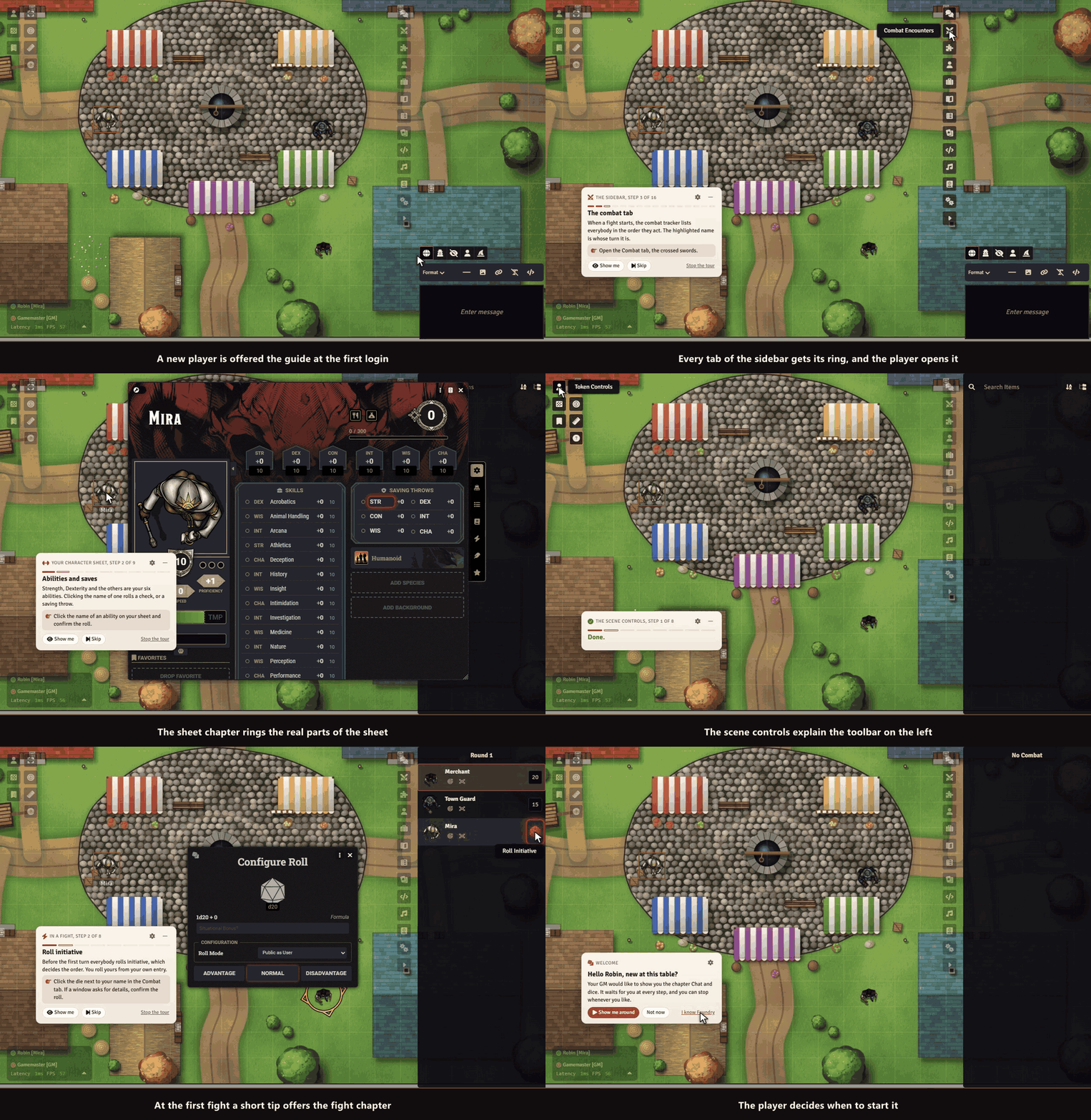
Sephral’s First Table A new player joins your game and has no idea where to click. You are busy running the table, and nobody wants to explain the same ten things again. First Table gives every new player a short, friendly first session of their own, started by itself at their first login. Highlights You do nothing. A small card welcomes a new player at the first login and offers the tour. No setup, no popup for you. It waits for the player. Every step goes on only after the player has really done it: opened the sheet, rolled, moved, targeted, pinged, measured, chatted and looked into the journal. Made for your game system. The roll step speaks the language of D&D 5e, Pathfinder 2e, SWADE and Crucible, and any other system gets a general text. Quiet and small. One card in the corner, never in the way of the map. Fold it to a pill, drag it aside, skip any step, stop whenever you like. Your table, your steps. Leave out steps you do not want, start the tour for a player yourself, and mark veterans as experienced. You see who finished. The overview lists every player with their progress. Come back any time. A small question mark in the controls and the module settings restart the tour. English and German. The tour speaks the language of each player. Nothing is changed in your actors, scenes or chat. The module only remembers how far each player got. How it works Enable the module in your world. Players who log in for the first time get the offer and take the tour at their own speed. Open the player overview from the module settings to see who is done, or to start the tour for someone. Good to know A world that is already in use starts with the offer switched to "only when I start it for a player", so your regulars are never surprised. You can change that in the settings. Install First Table is not in Foundry's module search. Copy this link: https://github.com/Sephral/sephrals-first-table/releases/latest/download/module.json In Foundry's setup screen open Add-on Modules and click Install Module . Paste the link into Manifest URL at the bottom of the window. Click Install , then enable the module in your world. On The Forge open the Bazaar, click Install From Manifest and paste the link. Foundry VTT 13 and 14 · any game system · English and German Learn more Every setting and the macro API are explained in the manual . Questions or ideas? Join us on Discord . Looking for more? See all modules by Sephral . License See LICENSE.md .
Sephral’s Map Knowledge
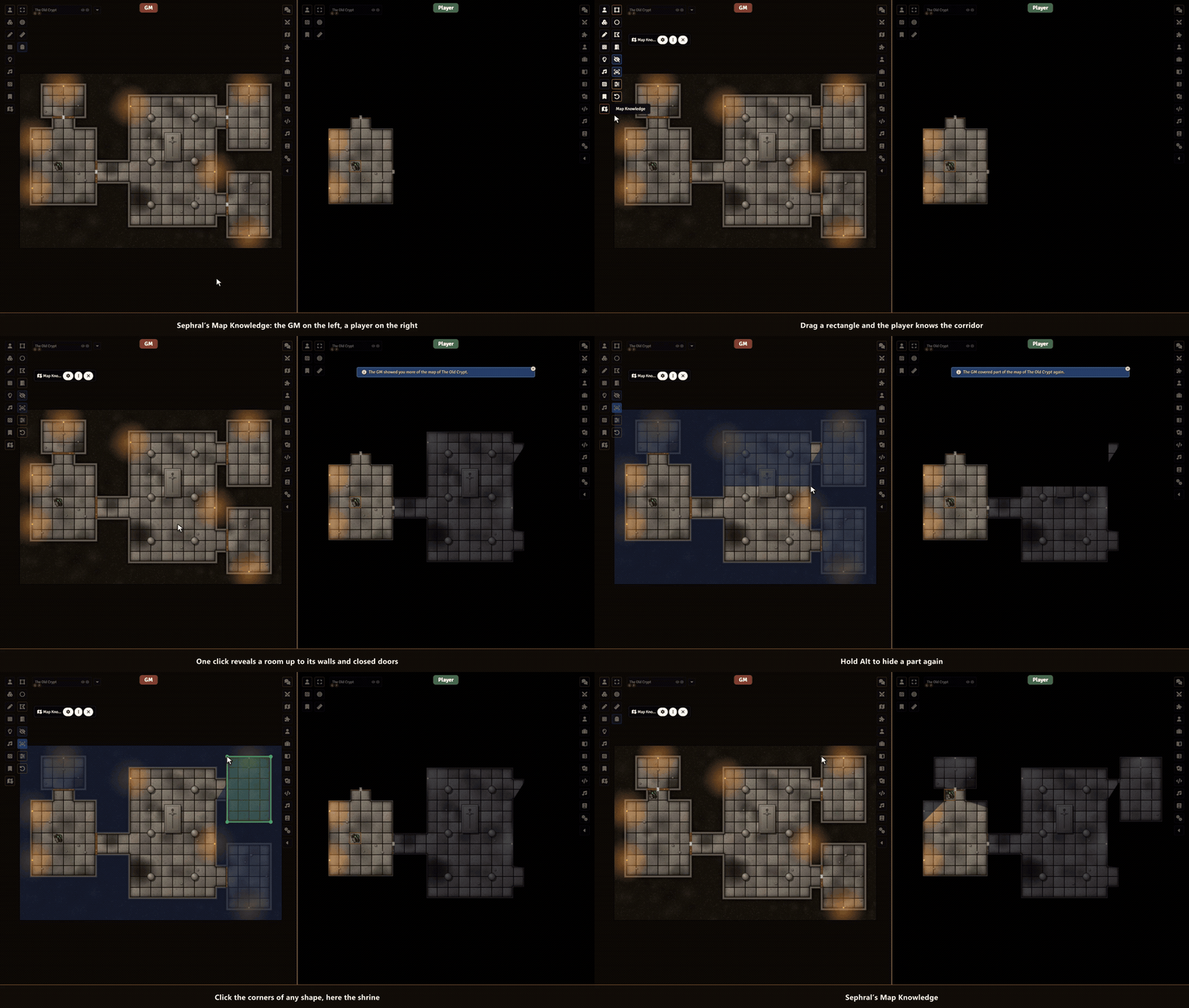
Sephral’s Map Knowledge The party found the old map of the dungeon, or the scout came back and drew what she saw. In Foundry the players still stare at black fog until their tokens walk every corridor. Map Knowledge lets you mark parts of the map as known, for everyone or for chosen players, while token vision keeps working. Highlights Draw what they know: drag a rectangle or an ellipse, click the corners of a polygon, and the area is explored for your players. They see the map there in the remembered fog color, monsters stay hidden until real sight reaches them. A whole room with one click: click into a room and the walls are its border, closed doors and windows included. For the right players: reveal for everyone or only for the elf who knows the forest. Players who are offline get it on their next visit. Cover it again: switch to hide, or hold Alt while you draw, and the players forget an area. Undo takes your last change back. See what they know: a tint shows on your map what the chosen players do not know yet, for the whole group or one player. See through their eyes: look at your map the way one player knows it, switch between players with one click, and nothing is changed. Check first: a shape waits until you have seen the result as the player. Then apply or discard. The scout tells the others: give the chosen players everything one player knows of this Level. Triggered by a Region: a token walks through the gate and the hall behind it becomes known, once or every time. Levels and shared fog: works per Level of a scene and with Foundry’s shared fog of war. How it works Open a scene with token vision and fog exploration, and pick Map Knowledge in the scene controls. Choose who learns it in the window: all players or the chosen ones. Drag, click corners or click into a room. Done, the players see the area as explored. Good to know Map Knowledge writes into Foundry’s own fog of war, so it needs a scene with token vision and fog exploration. It runs on Foundry 14. Install Search for Map Knowledge in Foundry's module browser or open the package page . Foundry VTT 14 · any game system · English and German Learn more Every tool, setting and the macro API are explained in the manual . Questions or ideas? Join us on Discord . Looking for more? See all modules by Sephral . License See LICENSE.md .
Sephral’s Saved Encounters
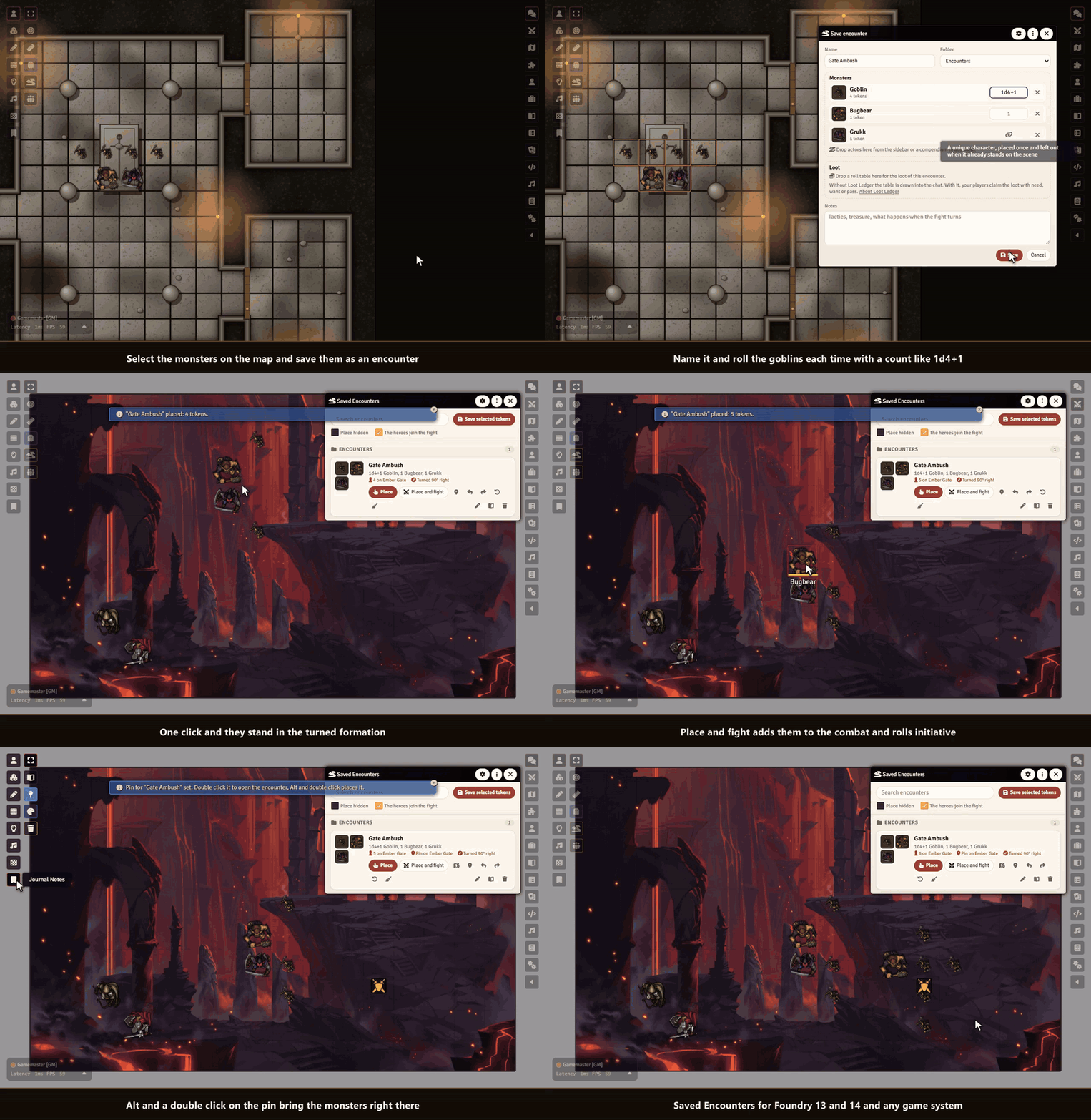
Sephral’s Saved Encounters You spent twenty minutes setting up the goblin ambush on the bridge, and the players took the other road. Next session they finally walk into it, and you start dragging tokens again. Saved Encounters keeps that setup: save the monsters once and put the whole group back on any map with one click. Highlights Save what is on the map: select the monsters, click once and they are kept with their formation, names, pictures, sizes and hidden state. Place with a preview: the group follows your mouse over the map as a ghost and snaps to the grid. A click sets it down, also on maps with another grid size, on hexes and on gridless maps. Turn the group: press Q or E while you place and the whole formation turns by 90 degrees. The encounter and its pin remember which way it faces. Counts that roll: give the goblins 1d4+1 and every placement brings a different war band. Extra monsters find free squares next to their friends. Unique villains stay unique: a named boss linked to his actor stands on a scene only once. Place the encounter again and he is left out with a short notice, while his goblins still come. Straight from the compendium: drop monsters from the sidebar or a compendium into an encounter. They are imported once when you first place them. Place and fight: one button sets the monsters down, adds them and the heroes on the scene to the combat and rolls initiative for the monsters. Pins on the map: mark where an encounter waits. Alt and a double click on the pin and the monsters appear right there. Run it again: remove the placed monsters or set it up fresh at the same spot. Loot included: link a roll table to an encounter and roll it after the fight, into Sephral’s Loot Ledger when you use it. How it works Select the monsters of an encounter on the map and click Save selected tokens as an encounter in the token controls. Give it a name, a count for each kind of monster and some notes, then save. Open Saved Encounters from the token controls or the journal sidebar, click Place or Place and fight , turn the group with Q and E if you like and click where it should stand. Good to know Encounters are journal entries in a folder only the GM sees, so players never find them. Put them into a compendium to use them in other worlds. Install Search for Saved Encounters in Foundry's module browser or open the package page . Foundry VTT 13 and 14 · any game system · English and German Learn more Every button, setting and the macro API are explained in the manual . Questions or ideas? Join us on Discord . Looking for more? See all modules by Sephral . License See LICENSE.md .
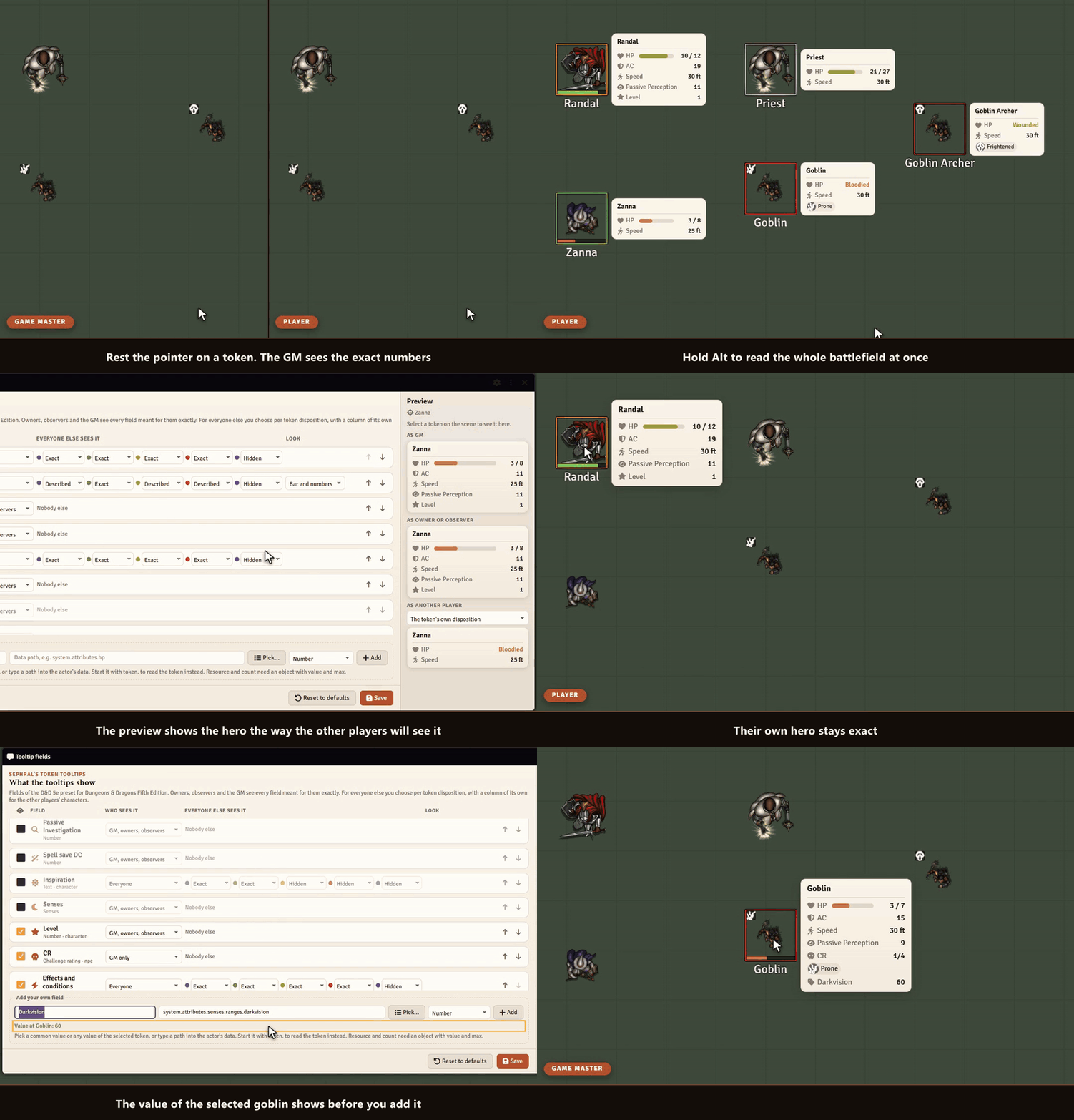
Sephral’s Token Tooltips
Sephral’s Token Tooltips "How hurt is the goblin?" "What was my armor class again?" Rest the pointer on a token and the answer is right there: health as a bar or a word like bloodied, armor, speed and every condition. You decide what each player gets to see. Highlights One glance, no sheet: health, armor, speed, conditions and more appear next to the token. Words instead of numbers: players see that the ogre is bloodied or near death without learning its hit points. You decide who sees what: every value has its own audience, from GM only to everyone, and its own form for friends, neutrals, foes and secret tokens. A column for the party: choose how players see each other's heroes, for example how hurt a friend is without the exact hit points. Friendly NPCs keep their own setting. Floating numbers, per audience: damage and healing float up from the token, exact for friends, described for foes ("a scratch", "badly hurt"), and on request in place of the system's own numbers. Observers see like owners: a player who may observe a character sees its tooltip just like its owner. Ready for your system: presets for D&D 5e, Pathfinder 2e, Savage Worlds, Crucible, Daggerheart, Call of Cthulhu and more. Any other system shows the token bars and conditions right away. More when you need it: values often needed in play, such as passive Insight, the spell save DC or hero points, wait in the list for a tick. Your own values with a click: pick from the common values of your system or from every value of a token, see its current value and add it. Live preview: see a token as the GM, as its owner, as another player and as a party member before you save. Distance, tracker, sharing: distance, height and cover on request, tooltips in the combat tracker, export and import of your fields with a preview of what changes, or start from a ready preset. All tooltips at once: hold Alt and every visible token shows its tooltip. Safe by design: hidden tokens stay hidden, and names follow each token's own name display. How it works Enable the module. Rest the pointer on a token and its tooltip appears. As GM, open Configure fields in the module settings, tick the values you want and choose what players see. Hold Alt during a fight to read the whole battlefield at once. Good to know Players can only ever see what the GM allows. Like every value that reaches a player's browser, the data behind a tooltip could still be read by a player who opens the browser tools. Install Search for Token Tooltips in Foundry's module browser or open the package page . Foundry VTT 13 and 14 · any game system · English and German Learn more Every field, setting and the API for other modules are explained in the manual . Questions or ideas? Join us on Discord . Looking for more? See all modules by Sephral . License See LICENSE.md .
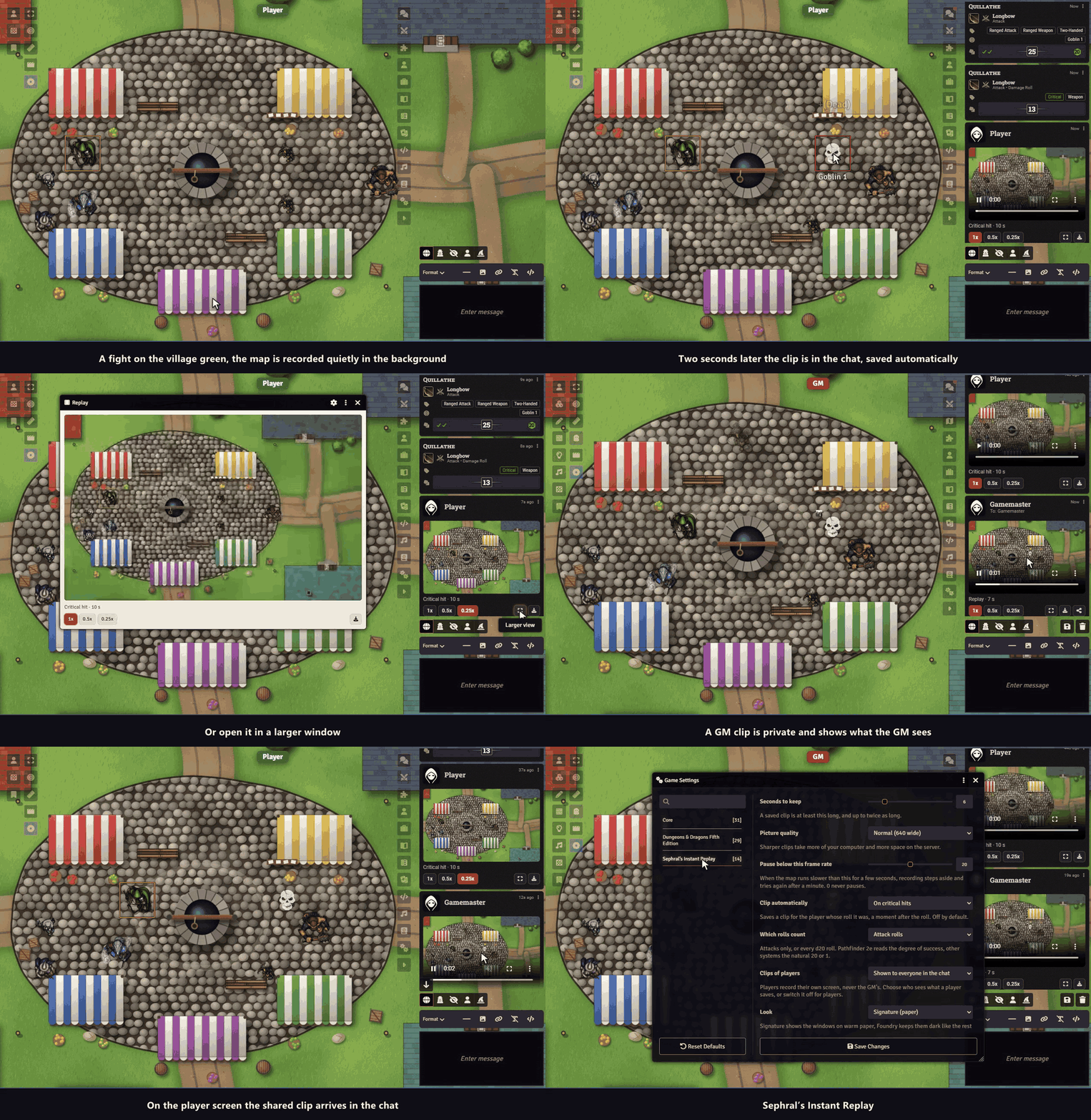
Sephral’s Instant Replay
Sephral’s Instant Replay The barbarian rolls a natural 20, the table roars, and nobody can say what the map looked like. Instant Replay keeps the last seconds of the battle map ready. One click and they are a short clip in the chat, in slow motion if you like. Highlights One click: the clapperboard in the token controls saves the last seconds of the map as a clip and posts it in the chat with a player, slow motion buttons and a download. Automatic on the big moments: if the GM wants it, a critical hit or a fumble saves a clip a moment later for the player who rolled. Natural 20 and 1 in most systems, the degree of success in Pathfinder 2e. Off by default. Everybody sees only their own map: each screen records what its own player sees, so hidden things stay hidden. A GM’s clip stays private until the GM shows it. Light on the computer: a small picture at ten frames a second, copied in a fraction of a millisecond. On a slow screen the recording pauses by itself and tries again later. Easy to share: the clip is a plain video file. Download it and post it wherever your group talks. How it works Enable the module. Every screen starts keeping the last seconds of its map. Click the clapperboard in the token controls on the left. The clip appears in the chat. As GM, choose in the settings whether critical hits and fumbles save a clip by themselves, and whether players’ clips are shown to everyone or only to you. Good to know Only the map is recorded. Windows, the chat and dice that are drawn on top of the page are not part of the clip. Install Instant Replay is not in Foundry’s module search yet. Install it with this link: https://github.com/Sephral/sephrals-instant-replay/releases/latest/download/module.json In Foundry’s setup screen open Add-on Modules and click Install Module . Paste the link into Manifest URL at the bottom of the window. Click Install , then enable the module in your world. On The Forge open the Bazaar, click Install From Manifest and paste the link. Foundry VTT 13 and 14 · any game system · English and German Learn more Every setting, the clip window and the macro API are explained in the manual . Questions or ideas? Join us on Discord . Looking for more? See all modules by Sephral . License See LICENSE.md .
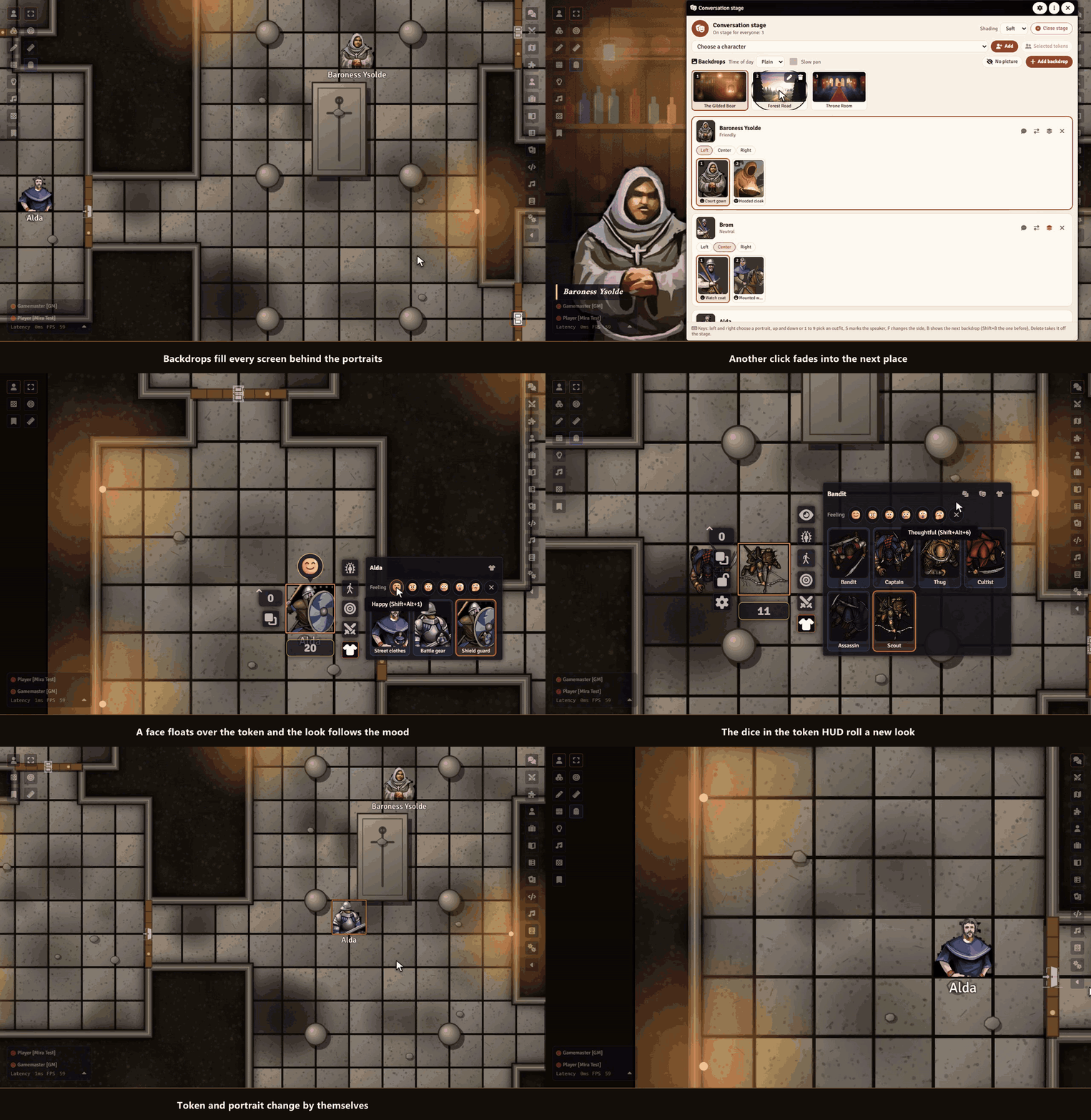
Sephral’s Token Wardrobe
Sephral’s Token Wardrobe Your rogue walks into the tavern in street clothes, climbs into battle gear for the fight and dresses up for the duke’s ball. One click on the sheet or the token puts a look on: portrait and token change together. Highlights A conversation stage: the GM brings portraits big onto every screen. One click changes the expression, a mark shows who speaks. Backdrops for the stage: a wide picture behind the portraits, like a scene of a film: tavern, throne room, forest road. It fades into the next one, pans slowly and takes the light of dawn, dusk or night. Every figure looks different: place five bandits and each one gets its own look. Feelings of the players: a happy, worried or angry face floats over the token and the portrait, and the look changes with it. Equipment as trigger: equip the armor and its outfit follows, take it off and the old look is back. Disguises: an outfit can carry another name that players see on the token, in chat and on the stage. Outfits by place: a Region puts an outfit on every token that enters it. Made for players: a shirt button on the sheet and a palette in the token HUD. Click a look, done. Drop images in: from your computer, Foundry’s file browser or another character. Outfits that put themselves on: battle gear when the fight starts, a bloodied look below half the hit points. Afterwards your chosen look comes back. How it works Open the wardrobe from the shirt button on a sheet, the token HUD or the actor sidebar, and click Start with three outfits . Drop pictures onto the cards and click Put on . Players switch looks on their own sheet or token. The GM decides in the settings what players may do. For a conversation, right click an actor in the sidebar and choose Bring to the conversation stage . Install Token Wardrobe is not in Foundry's module search. Copy this link: https://github.com/Sephral/sephrals-token-wardrobe/releases/latest/download/module.json In Foundry's setup screen open Add-on Modules and click Install Module . Paste the link into Manifest URL at the bottom of the window. Click Install , then enable the module in your world. On The Forge open the Bazaar, click Install From Manifest and paste the link. Foundry VTT 13 and 14 · any game system · English and German Learn more Every button, setting and the macro API are explained in the manual . Questions or ideas? Join us on Discord . Looking for more? See all modules by Sephral . License See LICENSE.md .
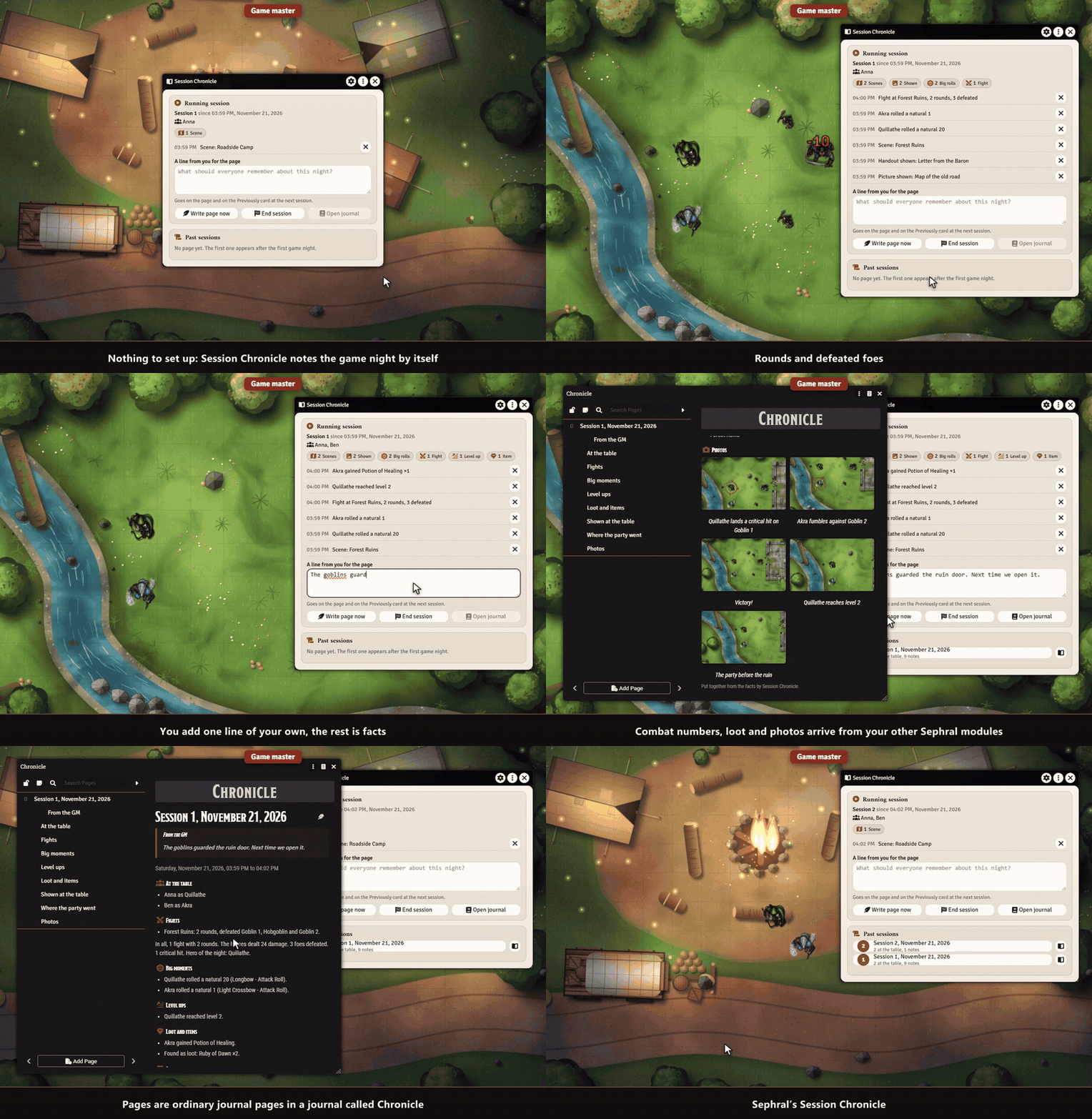
Sephral’s Session Chronicle
Sephral’s Session Chronicle Your players ask what happened last time, and you spend the first ten minutes of the evening remembering. Session Chronicle writes up every game night for you, without any AI: one journal page per session, a "Previously" card at the next start, and a private "What you missed" card for players who come late. Highlights You do nothing. The module notices what happens while players are online. No setup, no button to remember. One page per game night. Who was at the table, the fights with rounds and defeated foes, level ups, loot, every picture and handout you showed, and the natural 20s and 1s. No AI, only facts. Every sentence is built from what really happened, so the page never invents a thing. You add a line of your own, and that is the part that reads like a story. "Previously" at the next start. A card in the chat tells everybody the story of last time and opens the full page. "What you missed" for late players. Whoever comes late or back after a break gets a private card with the highlights they missed. Finds the sessions by itself. A few hours of quiet end a session, also across midnight. Grows with your other Sephral modules. Combat numbers, album photos and loot come onto the page when Combat Log and Stats, Campaign Album or Loot Ledger are active. Yours to keep. Pages are ordinary journal pages in a journal called Chronicle. Edit them, share them, back them up. English and German. How it works Enable the module in your world. Nothing else to set up. Play. The window from the token controls shows what has been noted, and you can add a line for the page. The page appears after the session. At the next one everybody sees "Previously". Good to know Recording needs a player online, so your preparation never turns into a session. Whispers and rolls of monsters are never noted. Install Session Chronicle is not in Foundry's module search. Copy this link: https://github.com/Sephral/sephrals-session-chronicle/releases/latest/download/module.json In Foundry's setup screen open Add-on Modules and click Install Module . Paste the link into Manifest URL at the bottom of the window. Click Install , then enable the module in your world. On The Forge open the Bazaar, click Install From Manifest and paste the link. Foundry VTT 13 and 14 · any game system · English and German Learn more Every setting and the macro API are explained in the manual . Questions or ideas? Join us on Discord . Looking for more? See all modules by Sephral . License See LICENSE.md .
Sephral’s Roll Requests
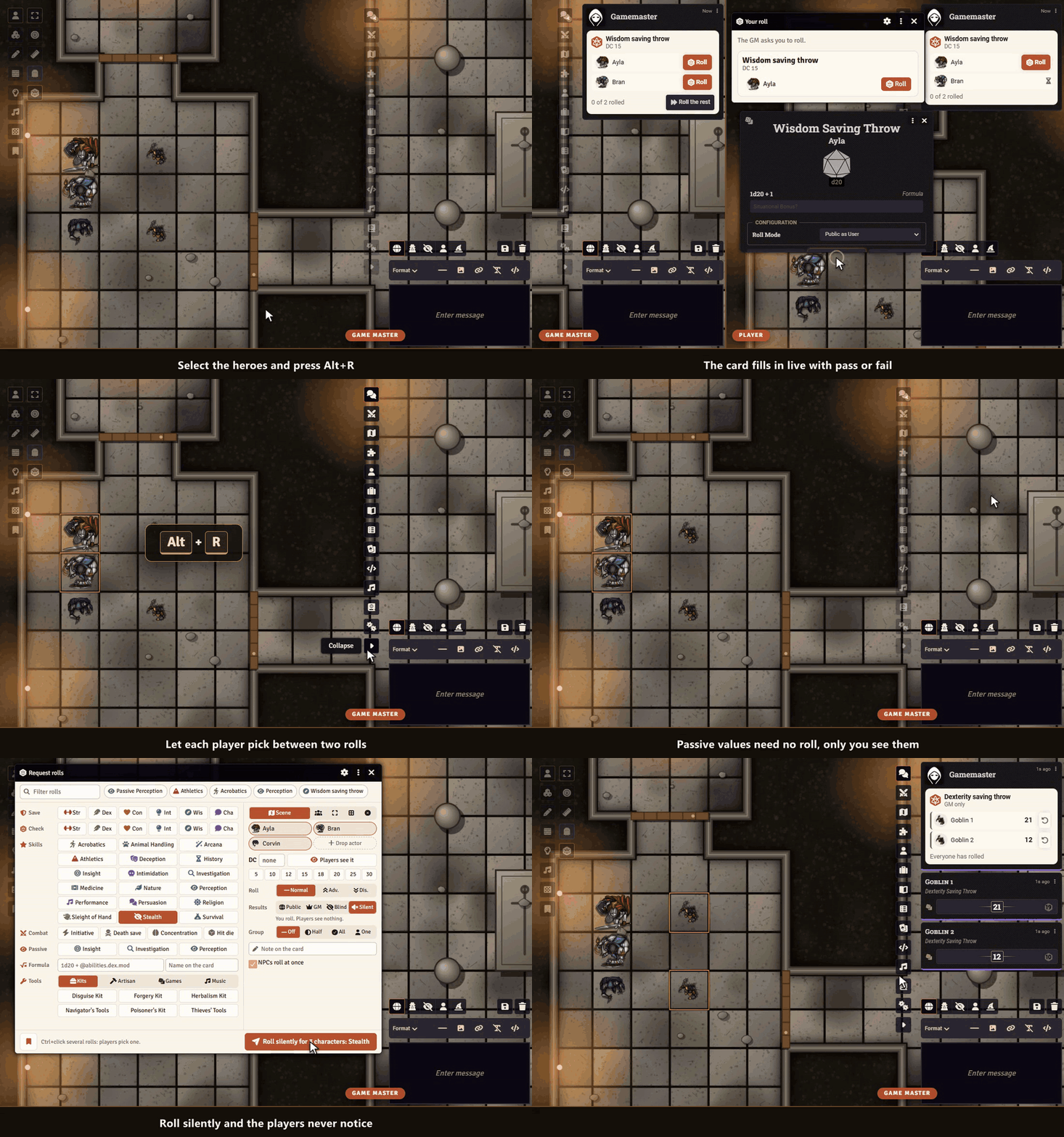
Sephral’s Roll Requests “Everyone, a Wisdom save.” Then the chat fills with rolls, someone rolls a Wisdom check instead, and you count by hand who made it. Roll Requests asks the whole group in two clicks, players roll with one, and a single card shows who passed. Highlights Ask anyone: the characters of the scene, your party, the selected tokens or any actor you drag in. Alt+R opens it, the token HUD asks for a roll too, and Add player brings in anyone else. Every roll one click away: saves, checks, skills and tools as buttons, with initiative, death saves and your own formula. Type a few letters to find one, or save a preset. One click for players: a small window and the chat card show a roll button for each character. The roll is the system's own, with its dialog and bonuses. One live card: totals, pass or fail against the DC and “3 of 4 passed” at a glance, filled in while your players roll. Natural 20s and 1s stand out. Let them choose: mark Athletics and Acrobatics and each player picks one. Secret when you want it: hide the DC, keep the results for your eyes only, let nobody see their own roll, or roll silently so the players never notice. One click rolls secretly for all chosen characters, and recent requests can be sent again. Planned checks: prepare "Perception DC 15, everyone in the scene, secret" ahead of time, send it with one click, or let a Region send it when a token walks in. Passive values: compare passive Perception in D&D 5e without a roll, on a card only you see. Group checks: half of the group, all of them or just one has to succeed, worked out for you. NPCs roll themselves: characters without a player roll at once, and one click rolls the rest for anyone who is away. Rerolls count: a hero point in Pathfinder 2e or a benny in Savage Worlds replaces the result on the card, and you can let anyone roll again. Nothing gets lost: rolls made without a GM reach their card when one joins, and late players still get the roll window. Many systems: D&D 5e, Pathfinder 2e, Savage Worlds and Crucible, formulas in any other system. How it works Select tokens and press Alt+R, or click the d20 in the token controls. Click the roll, set a DC if you like, and send the request. Watch the card fill up while your players roll. Good to know Players need to be online to roll, the GM can roll for anyone from the card. Install Search for Roll Requests in Foundry's module browser or open the package page . Foundry VTT 13 and 14 · any game system · English and German Learn more The request window, the visibility choices, the settings and the API for macros are explained in the manual . Questions or ideas? Join us on Discord . Looking for more? See all modules by Sephral . License See LICENSE.md .
Sephral’s Performance Doctor
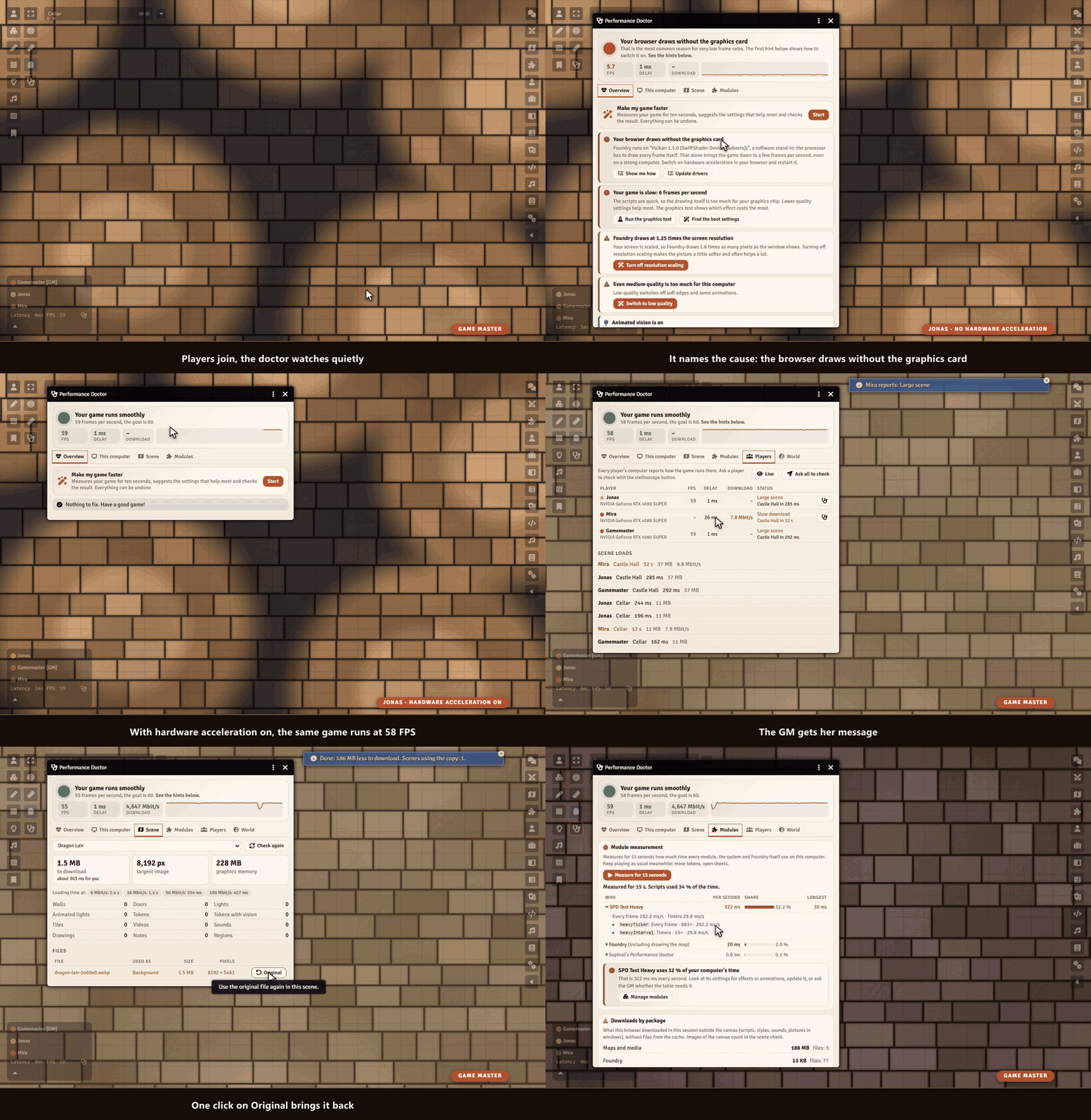
Sephral’s Performance Doctor Five frames per second on a strong computer? A map that never finishes loading for one player? Performance Doctor finds out why Foundry is slow, explains it in plain words and fixes it with you, step by step. Highlights Knows the usual suspects: a browser that draws without the graphics card, a scaled screen, quality set too high, a laptop on battery, the browser's energy saver. It names the cause and shows the way out for your browser. Make my game faster: ten seconds of measuring, the settings that help most with one click, a second measurement that shows the difference. Everything can be undone. Graphics test: switches lighting, animations, weather, videos and module effects off for a moment each and shows what costs the most on your computer. Which module eats the time: measures every module, the system and Foundry for 15 seconds, and the next start of Foundry too. With Sephral’s Module Loadouts the GM switches the expensive ones off for a test and back on with one click. Heavy scenes: the GM sees how many megabytes a scene sends to every player and how long the slowest player waits. A huge map becomes a small WebP copy with one click, and the original stays. The whole table at a glance: frame rate, delay, download speed and graphics chip of every player, a warning when someone still waits for a scene, and a button that asks a player to check. The world: what every player downloads when joining, the largest documents, images hidden inside journals, an oversized chat log. How it works Enable the module. Click the stethoscope in the token controls or next to the frame rate in the players list. Follow the hints. Players fix their own computer, the GM gets what only the GM can change. Good to know The doctor watches quietly and costs no noticeable time. When a game stays very slow, it offers its help on its own, once per session. Install Performance Doctor is not in Foundry's module search. Copy this link: https://github.com/Sephral/sephrals-performance-doctor/releases/latest/download/module.json In Foundry's setup screen open Add-on Modules and click Install Module . Paste the link into Manifest URL at the bottom of the window. Click Install , then enable the module in your world. On The Forge open the Bazaar, click Install From Manifest and paste the link. Foundry VTT 13 and 14 · any game system · English and German Learn more What the doctor measures, how it finds the causes and every setting are explained in the manual . Questions or ideas? Join us on Discord . Looking for more? See all modules by Sephral . License See LICENSE.md .