Sephral’s Roll Requests
by Sephral
Claimed by sephral
v1.0.2
Updated Nov 4, 2026
Install
Description
Sephral’s Roll Requests
“Everyone, a Wisdom save.” Then the chat fills with rolls, someone rolls a Wisdom check instead, and you count by hand who made it. Roll Requests asks the whole group in two clicks, players roll with one, and a single card shows who passed.
Highlights
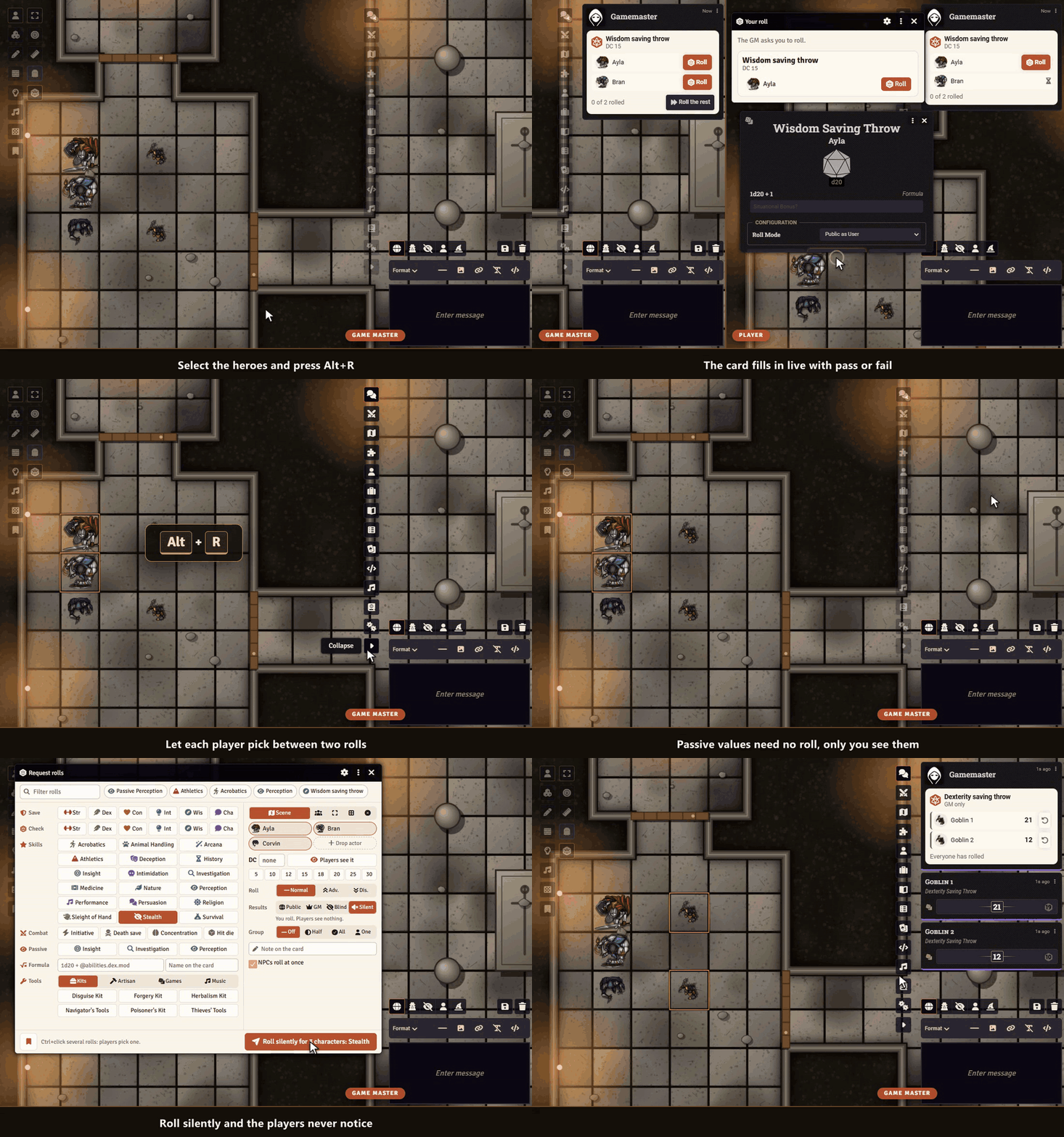
- Ask anyone: the characters of the scene, your party, the selected tokens or any actor you drag in. Alt+R opens it.
- Every roll one click away: saves, checks, skills and tools as buttons, with initiative, death saves and your own formula. Type a few letters to find one, or save a preset.
- One click for players: a small window and the chat card show a roll button for each character. The roll is the system's own, with its dialog and bonuses.
- One live card: totals, pass or fail against the DC and “3 of 4 passed” at a glance, filled in while your players roll. Natural 20s and 1s stand out.
- Let them choose: mark Athletics and Acrobatics and each player picks one.
- Secret when you want it: hide the DC, keep the results for your eyes only, let nobody see their own roll, or roll silently so the players never notice.
- Passive values: compare passive Perception in D&D 5e without a roll, on a card only you see.
- Group checks: half of the group, all of them or just one has to succeed, worked out for you.
- NPCs roll themselves: characters without a player roll at once, and one click rolls the rest for anyone who is away.
- Rerolls count: a hero point in Pathfinder 2e or a benny in Savage Worlds replaces the result on the card, and you can let anyone roll again.
- Nothing gets lost: rolls made without a GM reach their card when one joins, and late players still get the roll window.
- Many systems: D&D 5e, Pathfinder 2e, Savage Worlds and Crucible, formulas in any other system.
How it works
- Select tokens and press Alt+R, or click the d20 in the token controls.
- Click the roll, set a DC if you like, and send the request.
- Watch the card fill up while your players roll.
Good to know
Players need to be online to roll, the GM can roll for anyone from the card.
Install
Search for Roll Requests in Foundry's module browser or open the package page.
Foundry VTT 13 and 14 · any game system · English and German
Learn more
The request window, the visibility choices, the settings and the API for macros are explained in the manual. Questions or ideas? Join us on Discord. Looking for more? See all modules by Sephral.
License
See LICENSE.md.
Comments(0)
Sign in to join the discussion.