Sephral’s Roll Breakdown
by Sephral
Sephral’s Roll Breakdown
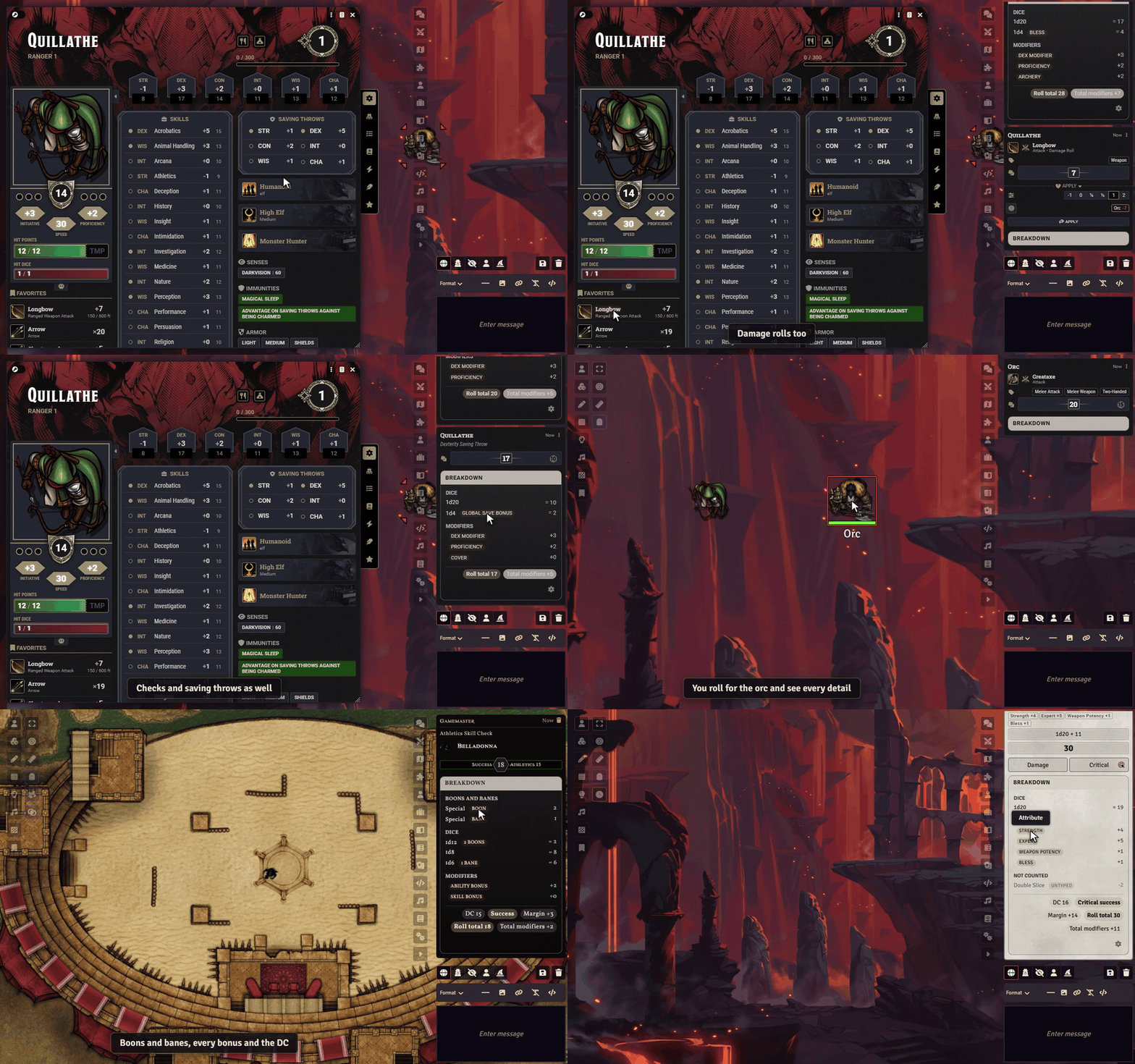
"Wait, why is my attack +9?" Roll Breakdown answers that right on the chat card: every die, every modifier and, in D&D 5e, the reasons for advantage and disadvantage.
The demo uses Quillathe, one of the premade heroes of the D&D 5e system, with Bless and Archery as active effects.
Highlights
- The answer at a glance: one short line on the card names the main parts, such as "+5 STR, +3 Prof, +1d4 Bless, advantage from Help". No click needed, and resting the mouse on it shows the full breakdown with the chance of success against the target.
- Every number explained: a click on the line opens a compact panel on the chat card shows the dice, the modifiers and every other part of the formula.
- Made for D&D 5e: attacks, damage, saves, ability, skill and tool checks, concentration and death saves, each with its real sources.
- Why advantage? When modules like MidiQOL record the reasons, the panel lists them, such as flanking, a prone target or long range. In D&D 5e 6 it also names the effects whose rules grant advantage or a bonus.
- Fits your chat: the breakdown takes the colors of the chat card, and the parchment look stays available as Classic. My dice luck shows how your d20s went this evening.
- Honest by design: the panel only shows what the roll really contains. It never guesses a source.
- Monster bonuses stay secret: players see no breakdown on NPC and GM rolls, unless you want them to.
- GM rolls stay behind the screen: if you like, players see only the total of your rolls, and your private rolls not at all.
- Out of the way: the panel stays folded until someone opens it, and an open panel stays open while the chat updates. Each player picks for themselves: line only, line and button, or button only.
- Made for Crucible too: see which boons and banes changed which die, where every bonus comes from, the result against the DC and how the damage adds up.
- More systems: Pathfinder 2e, Starfinder 2e and Savage Worlds show their named modifiers and results, every other system gets a general breakdown of dice and modifiers.
How it works
- Enable the module.
- Roll as usual.
- Read the short line on the chat card, or click it to see every part.
You decide who sees the line and the panel: only the GM, the GM and the owner of the roll, or everyone.
Install
Search for Roll Breakdown in Foundry's module browser or open the package page.
Foundry VTT 13 and 14 · any game system, extra details for D&D 5e, Crucible, Pathfinder 2e, Starfinder 2e and Savage Worlds · English and German
Help it get better
A modifier shows up as unknown? Post a screenshot of the chat card on Discord and help teach the breakdown something new.
Learn more
The manual lists every setting, explains what can be resolved and what cannot, and what a helpful bug report contains.
Looking for more? See all modules by Sephral.
License
See LICENSE.md.
Comments(0)
Sign in to join the discussion.