Sephral’s Combat Log & Stats
by Sephral
Sephral’s Combat Log & Stats
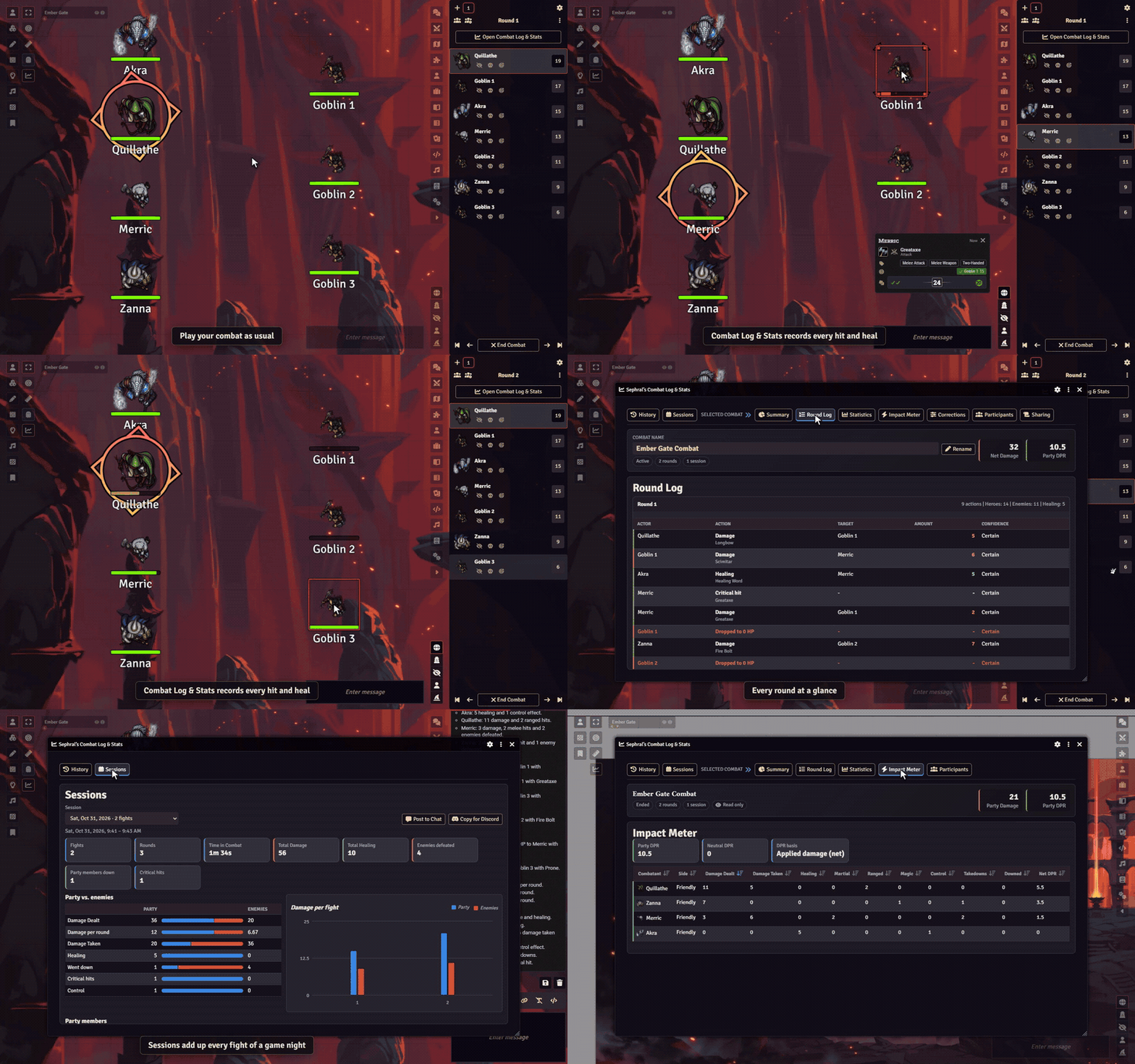
Who carried the fight? Who almost went down? Who kept the ogre on the ground for three rounds? Combat Log & Stats records every fight while you play and turns it into numbers for you and a recap your players will love to read.
Highlights
- Records itself: start a combat as usual and the log runs in the background, round by round. A reload does not stop it.
- Every number that matters: damage dealt and taken, healing, takedowns, times downed, critical hits, fumbles, control plays and damage per round for every combatant.
- Credit where credit is due: in D&D 5e every hit and every heal applied from a chat card goes to the combatant who rolled it, overkill included, also when Midi-QOL applies the damage. In other systems the module matches hit point changes to the rolls behind them.
- Made for Crucible too: health, wounds, morale and madness, heroes who end up Weakened, Broken or Dead, and every action card you confirm credited to the one who used it.
- Impact Meter, charts and awards: a sortable ranking of the fight, damage per round for the party and the enemies, and awards such as MVP, Best Healer, Damage Sponge and Lucky Dice.
- Game nights at a glance: the Sessions tab adds up every fight of an evening or of the whole campaign, with total damage and healing, the party against the enemies, every hero and the awards of the night. Post it to chat or copy it for Discord.
- Recaps for the whole table: share a report in chat, as a journal entry or straight into Discord. Pick sections such as Hero Moments, Close Calls, Damage Spotlight or Tactical Turning Points and check the live preview before anyone else sees it.
- Players can look too, your secrets stay secret: your players open the same window read only, with the sharing choices you made for each fight. Enemy names, hidden combatants and enemy numbers can stay hidden, GM notes and private rolls never appear.
- You have the last word: anything the log could not explain waits in the Corrections tab, you can add or reduce damage and healing by hand, and every fight exports as JSON, Markdown or CSV.
How it works
- Start a combat in the combat tracker. The log starts with it.
- Play as always. Roll and apply damage and healing from the chat cards.
- End the combat. The summary opens, and the Sharing tab turns it into a report for your players.
Open the window any time with the chart icon in the token controls or the button in the combat tracker.
Install
Search for Combat Log & Stats in Foundry's module browser or open the package page.
Foundry VTT 13 and 14 · any game system, exact attribution in D&D 5e and Crucible · English and German
Learn more
The manual explains exactly what is tracked, every setting, the report sections, the exports and where combat logs are stored, also on The Forge.
Questions or ideas? Join us on Discord. Looking for more? See all modules by Sephral.
License
See LICENSE.md.
Comments(0)
Sign in to join the discussion.